
Security SCA Documentation
Software composition analysis (SCA) of an application: the known vulnerabilities of its Composer packages, checked with composer audit, as an A4 PDF report by CVE and risk, in the design of the reports of pieceofcake2/report. The exit code fails CI when a vulnerability reaches a risk.
- Fixing a Vulnerability: reading an advisory, updating the package, and staying up to date
- CI with GitHub Actions
It is one of the security checks of pieceofcake2, with pieceofcake2/security-sast (the source code) and pieceofcake2/security-dast (the running application); pieceofcake2/security-check runs them all.
What is Checked
Every package of composer.lock, the packages that the application requires and the packages that they require, in the versions that are installed:
- Known vulnerabilities: the security advisories published for the installed version of a package, e.g. an SQL injection of a version of a library, with their CVE and risk (see Where the Vulnerabilities Come From)
- Abandoned packages: the packages that their authors no longer maintain (see Abandoned Packages)
The code of the application is not checked here: see pieceofcake2/security-sast for it, and pieceofcake2/security-dast for the running application.
Requirements
- PHP 8.0+ and Composer 2.4+ (
composer audit) composer.lockin the project: the audit reads it, so the packages need not be installed- Google Chrome or Chromium 131+ to print the PDF, and on Linux
fonts-noto-cjkfor a Japanese report
Installation
composer require --dev pieceofcake2/security-scaUsage
vendor/bin/security-sca --pdf=tmp/security-sca.pdf --language=ja| Option | Environment variable | Default | |
|---|---|---|---|
--pdf=PATH | SECURITY_SCA_PDF | tmp/security-sca.pdf | The PDF report |
--fail-on=RISK | SECURITY_SCA_FAIL_ON | high | The lowest risk that fails: critical, high, medium, low or none |
--no-dev | SECURITY_SCA_NO_DEV | Leaves out the development packages (require-dev) | |
--project=DIR | the current directory | The directory of composer.json and composer.lock | |
--composer=COMMAND | SECURITY_SCA_COMPOSER | composer | The Composer command |
--language=LANG | SECURITY_REPORT_LANGUAGE | en | en or ja, or a language of --locale-dir |
--locale-dir=DIR | SECURITY_REPORT_LOCALE_DIR | <language>.json files that add or replace messages | |
--title=TITLE | SECURITY_SCA_TITLE | the title of the language | The title of the report |
--project-name=NAME | SECURITY_REPORT_PROJECT | the name in composer.json | The project under the title |
--note=TEXT | SECURITY_SCA_NOTE | A note on the cover | |
--settings=FILE | SECURITY_SETTINGS | config/security.php or app/Config/security.php | The settings file |
The exit code is 0 when no vulnerability reaches --fail-on, 1 when one does, and 2 when the audit or the report fails. A vulnerability whose risk is not known fails only with --fail-on=low.
The Settings File
The settings of the security checks of pieceofcake2 can be kept in the project, in config/security.php (app/Config/security.php of the legacy layout). It returns an array with a section for each check, and a report section that they share:
<?php
return [
    'report' => [
        'language' => 'ja',
        'dir' => 'tmp/security',
    ],
    'sca' => [
        'failOn' => 'medium',
        'noDev' => true,
    ],
];The keys of the sca section are the options in camel case (--fail-on is failOn). The report section has language, localeDir, project (the project name), note and dir, the directory of the reports (this one is written to tmp/security/security-sca.pdf). An unknown key of the sca section is an error. The options win over the environment variables, and the environment variables over the file.
The Report
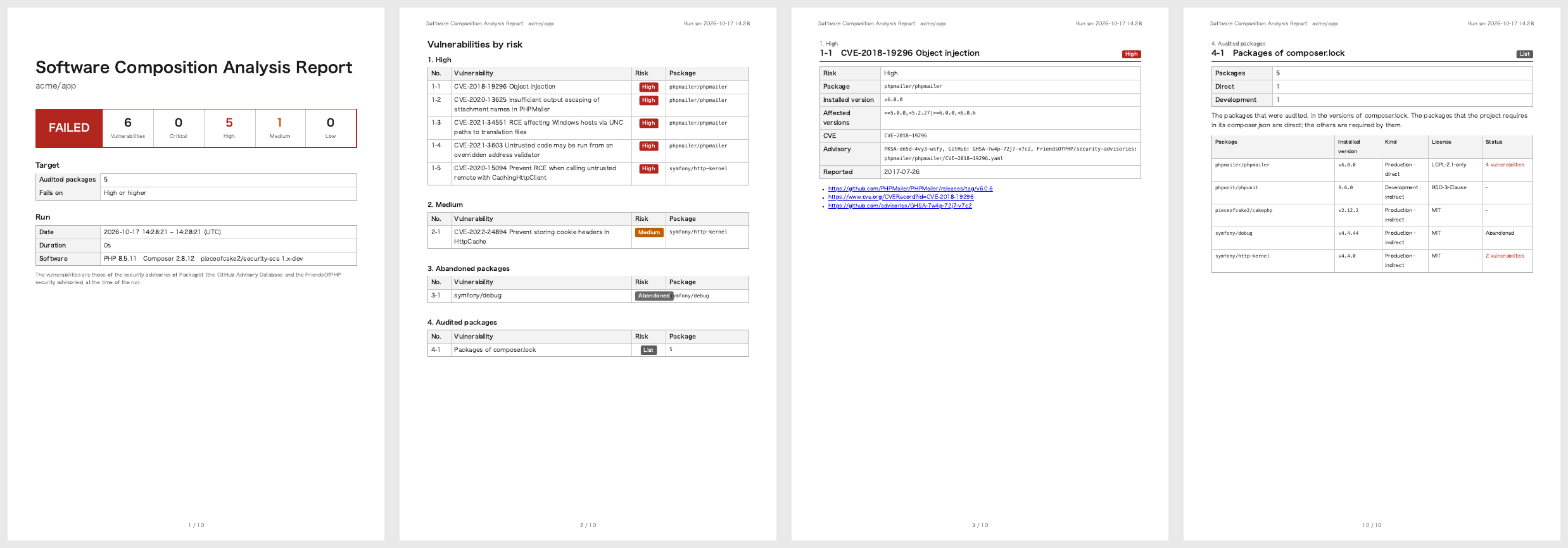
- Cover: the result, the numbers of vulnerabilities by risk, the repository, branch and commit, the number of audited packages, the threshold, and the date, environment and software of the run
- Vulnerabilities by risk: Critical, High, Medium, Low and Unknown, then the abandoned packages; each links to its page
- A page for each vulnerability: its CVE (or GHSA ID when it has no CVE) and title, risk, package, installed and affected versions, the IDs of the advisory, the date of the report, and the links to the advisory, the CVE record and the GitHub advisory
- Audited packages: every package of
composer.lock(without the development packages with--no-dev), with its version, whether it is a production or a development package, whether the project requires it directly or another package does, its licenses, and its vulnerabilities and whether it is abandoned. It is the inventory of what was checked, also when nothing was found
The vulnerabilities are those of the security advisories of Packagist at the time of the run: the GitHub Advisory Database (reviewed advisories) and the FriendsOfPHP security advisories.
Where the Vulnerabilities Come From
composer audit looks the packages of composer.lock up in the security advisories of Packagist, which come from:
- the GitHub Advisory Database: the advisories that GitHub has reviewed. An advisory that a project has published on its repository appears after GitHub reviews it, which can take days
- the FriendsOfPHP security advisories
The risk is the one of the advisory (critical, high, medium, low); an advisory without one is unknown. The report is the state of the advisories at the time of the run: run it again, e.g. every week in CI, to see the advisories published since.
Abandoned Packages
A package that its author has marked as abandoned on Packagist is listed after the vulnerabilities, with the package to use instead when the author gave one. It gets no fixes, also for vulnerabilities found later. The abandoned packages do not fail the run; see Abandoned Packages for their replacement.
Fixing a Vulnerability
Most vulnerabilities are fixed by updating the package: composer update vendor/package --with-dependencies. See Fixing a Vulnerability for reading an advisory, the packages that another package requires, CakePHP, the abandoned and the development packages, and staying up to date.
Ignoring an Advisory
When an advisory does not apply to the application, e.g. a vulnerability of Windows only, or of a feature that the application does not use, ignore it in composer.json with the reason (Composer 2.6+). It is then left out of composer audit and of the report:
{
    "config": {
        "audit": {
            "ignore": {
                "CVE-2021-34551": "Windows only: the application runs on Linux"
            }
        }
    }
}The key is the CVE ID, the advisory ID (PKSA-...) or the ID of a source of the advisory, e.g. its GHSA ID. Update the package instead when you can: an ignored advisory is easily forgotten.
Troubleshooting
composer.lock is not found: run composer install (or composer update) in the project first, or give the project with --project.
composer audit failed: the message of Composer follows, e.g. the network to packagist.org is not allowed, or composer.lock is not valid. composer audit needs to download the advisories.
The vulnerabilities of an advisory that was just published are missing: it is not in the GitHub Advisory Database yet (see Where the Vulnerabilities Come From).
Chrome is needed to print the report: install Chrome or Chromium, or set REPORT_CHROME_BINARY (see pieceofcake2/report).