
Totp Plugin Documentation
The Totp plugin adds two-factor authentication to the login of CakePHP 2 applications. After the username and the password, users enter the 6-digit code of their authenticator app: a time-based one-time password (TOTP, RFC 6238).
The codes work with any authenticator app: Google Authenticator, Microsoft Authenticator, 1Password, Bitwarden, Authy, the password managers of iOS and Android, and others. The codes are calculated by pragmarx/google2fa.
- Installation
- Configuration
- Database
- Two-Step Login
- One-Step Login (TotpAuthenticate)
- Setting Up Two-Factor Authentication
- Replay Protection
- Security
- API Reference
- Testing
- Migrating from ceeram/google-authenticate
- Origin
Installation
Requirements: PHP 8.0+ and pieceofcake2/cakephp 2.12+.
Install the plugin with Composer. To show the QR code with TotpHelper::qrCode(), also install bacon/bacon-qr-code:
composer require pieceofcake2/totp
composer require bacon/bacon-qr-codeThe plugin has the cakephp-plugin type, so it is installed into your plugins directory by composer/installers. Set installer-paths in your application's composer.json:
| Layout | installer-paths |
|---|---|
Modern (config/, src/, templates/, plugins/) | "plugins/{$name}/": ["type:cakephp-plugin"] |
Legacy (app/Config/, app/Plugin/) | "app/Plugin/{$name}/": ["type:cakephp-plugin"] |
Load the plugin in config/bootstrap.php (legacy layout: app/Config/bootstrap.php). If you already use CakePlugin::loadAll(), this is not necessary:
CakePlugin::load('Totp');Configuration
The settings are optional. Set them with Configure::write('Totp', [...]), for example in config/bootstrap.php. The settings of the authenticate object, the component and the helper override them.
Configure::write('Totp', [
    'issuer' => 'My App',
    'window' => 1,
    'secretLength' => 32,
]);| Setting | Default | Description |
|---|---|---|
issuer | Host of the full base URL | Name of the application shown in the authenticator app. |
window | 1 | Number of 30-second periods accepted before and after the current one, for clock drift between the server and the phone. 1 accepts 3 codes, 0 only the current one. |
secretLength | 32 | Length of new secrets in Base32 characters: 16 (80 bits), 32 (160 bits, the length recommended by RFC 4226) or 64. |
Database
Add a column for the secret to the users table. For replay protection, also add a column for the time step of the last accepted code:
ALTER TABLE users
    ADD COLUMN secret VARCHAR(64) NULL DEFAULT NULL,
ADD COLUMN totp_time_step INT NULL DEFAULT NULL;A user with an empty secret (NULL or '') logs in with the username and the password only. Two-factor authentication is enabled for a user by storing a secret.
Two-Step Login
The recommended login asks for the code on a second page, only for users who have enabled two-factor authentication and entered the correct password:
- The login page asks for the username and the password.
TotpComponent::login()checks them with the authenticate objects ofAuthComponent(for exampleForm). - A user without a secret is logged in. For a user with a secret, the login is kept pending in the session (the user is not logged in yet) and the user is sent to the code page.
- The code page asks for the code.
TotpComponent::verifyLogin()checks it and logs the user in.
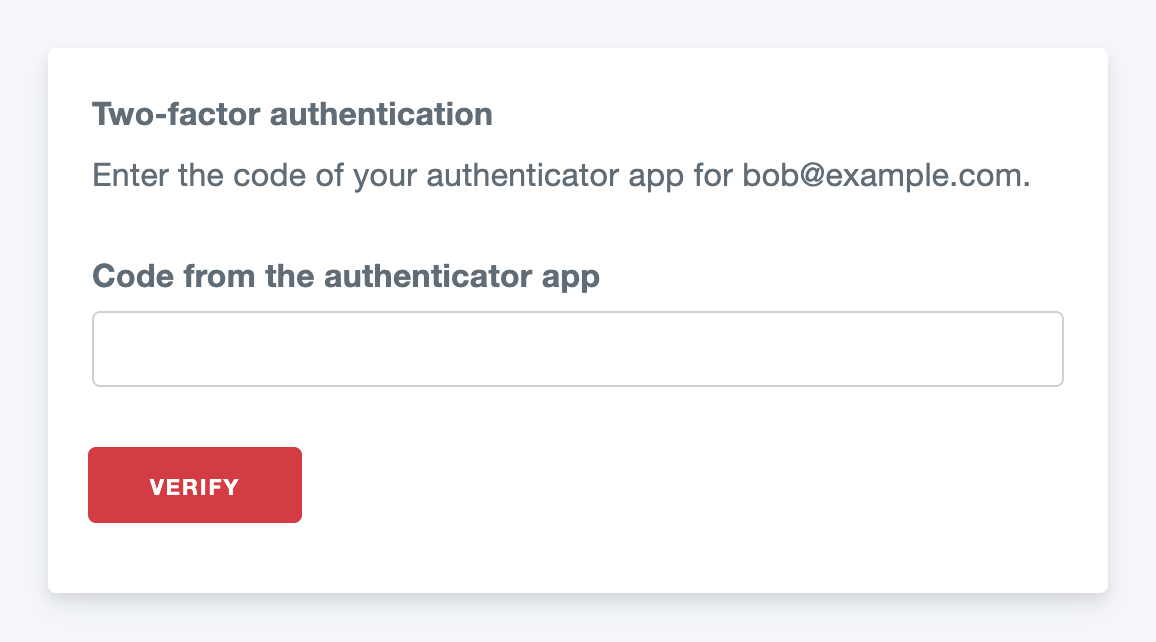
Keep the authenticate object of AuthComponent (for example Form), and add TotpComponent:
class AppController extends Controller
{
    public $components = [
        'Flash',
        'Auth' => [
            'authenticate' => [
                'Form' => [
                    'fields' => ['username' => 'email'],
                    'passwordHasher' => 'Blowfish',
                    'scope' => ['User.active' => 1],
                ],
            ],
        ],
        'Totp.Totp' => [
            'scope' => ['User.active' => 1],
        ],
    ];
}class UsersController extends AppController
{
/**
* Before filter.
*
* @return void
*/
public function beforeFilter()
{
parent::beforeFilter();
$this->Auth->allow('login', 'verify');
}
/**
* First step: username and password.
*
* @return CakeResponse|null
*/
public function login()
{
if ($this->request->is('post')) {
$result = $this->Totp->login();
if ($result === TotpComponent::LOGGED_IN) {
return $this->redirect($this->Auth->redirectUrl());
}
if ($result === TotpComponent::CODE_REQUIRED) {
return $this->redirect(['action' => 'verify']);
}
$this->Flash->error(__('Invalid email or password.'));
}
return null;
}
/**
* Second step: the code of the authenticator app.
*
* @return CakeResponse|null
*/
public function verify()
{
if (!$this->Totp->hasPendingLogin()) {
return $this->redirect(['action' => 'login']);
}
if ($this->request->is('post')) {
if ($this->Totp->verifyLogin($this->request->data('User.code'))) {
return $this->redirect($this->Auth->redirectUrl());
}
if (!$this->Totp->hasPendingLogin()) {
$this->Flash->error(__('Too many wrong codes. Please log in again.'));
return $this->redirect(['action' => 'login']);
}
$this->Flash->error(__('The code is not correct.'));
}
return null;
}
}<?php // templates/Users/verify.ctp (legacy layout: app/View/Users/verify.ctp) ?>
<?= $this->Form->create('User') ?>
<?= $this->Form->input('code', [
'label' => __('Code from the authenticator app'),
'autocomplete' => 'one-time-code',
'inputmode' => 'numeric',
'autofocus' => true,
]) ?>
<?= $this->Form->end(__('Verify')) ?>The login page is the usual one, with the username and the password only.
| Setting | Default | Description |
|---|---|---|
userModel | User | The user model. Use the same model as the authenticate object. |
fields.secret | secret | Column of the user model with the secret. |
fields.timeStep | totp_time_step | Column for replay protection. |
scope | [] | Conditions the user must still match when the code is entered, usually the scope of the authenticate object. |
replayProtection | false | Accept each code only once. |
expires | 300 | Seconds the pending login is valid. |
maxAttempts | 5 | Wrong codes allowed before the user must enter the password again. |
sessionKey | Totp.pending | Session key of the pending login. |
issuer, window, secretLength | Totp.* | See Configuration. |
Notes:
- Whether the second step is needed is decided by the secret in the database, not by the user data of the authenticate object, so
userFieldsdoes not need to include the secret. The user data must include the primary key. - The secret is not stored in the session, neither in the pending login nor in the logged-in user data.
AuthComponent::login()renews the session ID when the user is logged in. getPendingUser()returns the user data of the pending login, for example to show the username on the code page.cancelLogin()cancels it (for example on a "Back" link).- If the user's secret is removed between the two steps,
verifyLogin()logs the user in without a code, because the password has already been checked.
One-Step Login (TotpAuthenticate)
TotpAuthenticate checks the username, the password and the code sent together from one form. Use it to migrate from ceeram/google-authenticate, or when a second page is not possible. The two-step login is recommended for new applications: the one-step form shows the code field to all users, and asks for the code before the password has been checked.
Use Totp.Totp instead of Form in the authenticate setting of AuthComponent. TotpAuthenticate extends FormAuthenticate, so it supports the same settings (fields, userModel, userFields, scope, recursive, contain, passwordHasher):
class AppController extends Controller
{
    public $components = [
        'Flash',
        'Auth' => [
            'authenticate' => [
                'Totp.Totp' => [
                    'fields' => [
                        'username' => 'email',
                        'password' => 'password',
                        'code' => 'code',
                        'secret' => 'secret',
                    ],
                    'passwordHasher' => 'Blowfish',
                    'scope' => ['User.active' => 1],
                ],
            ],
        ],
    ];
}| Setting | Default | Description |
|---|---|---|
fields.code | code | Field of the login form with the code. |
fields.secret | secret | Column of the user model with the secret. |
fields.timeStep | totp_time_step | Column for replay protection. |
replayProtection | false | Reject a code that was already used to log in. |
window | Totp.window | See Configuration. |
Add the code field to the login form. Users without a secret leave it empty:
// templates/Users/login.ctp (legacy layout: app/View/Users/login.ctp)
echo $this->Form->create('User');
echo $this->Form->input('email');
echo $this->Form->input('password');
echo $this->Form->input('code', [
    'label' => __('Authentication code (if enabled)'),
    'autocomplete' => 'one-time-code',
    'inputmode' => 'numeric',
    'required' => false,
]);
echo $this->Form->end(__('Log in'));The login action is the usual one:
/**
 * Log in.
 *
 * @return CakeResponse|null
 */
public function login()
{
    if ($this->request->is('post')) {
        if ($this->Auth->login()) {
            return $this->redirect($this->Auth->redirectUrl());
        }
        $this->Flash->error(__('Invalid email, password or authentication code.'));
    }

    return null;
}The code is checked only when the username and the password are correct and the user has a secret. The code may contain spaces or hyphens (123 456). The secret (and the time step) is removed from the user data, so it is not stored in the session.
Setting Up Two-Factor Authentication
Let the user enable two-factor authentication on a page of the application. The example uses TotpComponent (loaded in AppController above) and TotpHelper, and the issuer from Configuration:
- Generate a secret and keep it in the session until it is confirmed.
- Show the secret as a QR code and as text.
- The user scans the QR code with the authenticator app and enters the first code.
- Store the secret only if the code is correct, so that a mistake does not lock the user out.
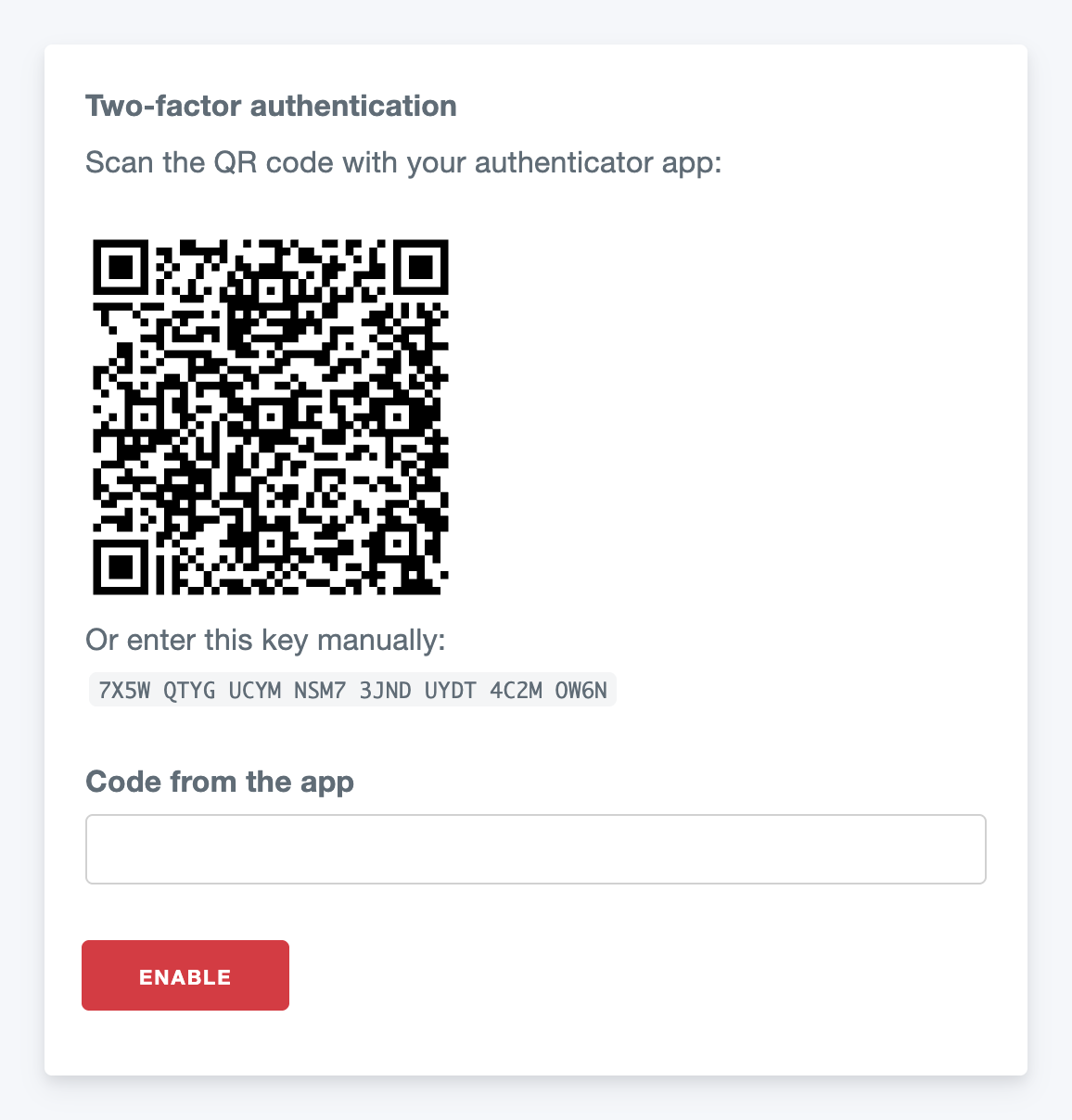
class UsersController extends AppController
{
    public $helpers = ['Totp.Totp'];

    /**
     * Enable two-factor authentication.
     *
     * @return CakeResponse|null
     */
    public function totp()
    {
        $this->User->id = $this->Auth->user('id');
        $secret = $this->Session->read('Totp.secret');
        if ($secret === null) {
            $secret = $this->Totp->generateSecret();
            $this->Session->write('Totp.secret', $secret);
        }

        if ($this->request->is('post')) {
            if ($this->Totp->verify($secret, $this->request->data('User.code'))) {
                $this->User->saveField('secret', $secret);
                $this->Session->delete('Totp.secret');
                $this->Flash->success(__('Two-factor authentication is enabled.'));

                return $this->redirect(['action' => 'view']);
            }
            $this->Flash->error(__('The code is not correct. Please try again.'));
        }

        $this->set('secret', $secret);
        $this->set('account', $this->Auth->user('email'));

        return null;
    }

    /**
     * Disable two-factor authentication.
     *
     * @return CakeResponse|null
     */
    public function disableTotp()
    {
        $this->request->allowMethod('post');
        $this->User->id = $this->Auth->user('id');
        $this->User->saveField('secret', null);
        $this->Flash->success(__('Two-factor authentication is disabled.'));

        return $this->redirect(['action' => 'view']);
    }
}<?php // templates/Users/totp.ctp (legacy layout: app/View/Users/totp.ctp) ?>
<h2><?= __('Two-factor authentication') ?></h2>
<p><?= __('Scan the QR code with your authenticator app:') ?></p>
<?= $this->Totp->qrCode($secret, $account) ?>
<p><?= __('Or enter this key manually:') ?> <code><?= $this->Totp->secret($secret) ?></code></p>
<?= $this->Form->create('User') ?>
<?= $this->Form->input('code', ['label' => __('Code from the app'), 'autocomplete' => 'one-time-code', 'inputmode' => 'numeric']) ?>
<?= $this->Form->end(__('Enable')) ?>Ask for the password again (or for a current code) before showing this page or before disabling two-factor authentication, as for other security settings.
Replay Protection
A code is valid for 30 seconds (up to 90 seconds with window 1). Someone who sees the code and the password, for example over the user's shoulder, could log in with the same code during this time. Enable replayProtection to accept each code only once. The setting is the same for the component (two-step login) and the authenticate object (one-step login):
'Totp.Totp' => [
    'replayProtection' => true,
    'fields' => ['timeStep' => 'totp_time_step'],
],On a successful login, the time step (Unix time / 30) of the code is stored in the totp_time_step column (INT NULL, see Database). Codes of the same or an older time step are rejected after that. The column is updated with a conditional UPDATE, so two concurrent logins with the same code cannot both succeed. When userFields is set, the user data must contain the primary key.
Security
- Limit the login attempts. A code has 6 digits and up to 3 codes are valid at a time, so an attacker who knows the password could guess a code by trying many times. The two-step login cancels the pending login after
maxAttemptswrong codes, but the password can be entered again, so also lock the account or slow down the logins after some failed attempts (by IP address and by account). - Protect the secrets. Anyone with the secret can generate the codes. Do not log them, restrict access to the database backups, and consider encrypting the column (for example with
Security::encrypt()inbeforeSave()/afterFind()of the user model). - Plan for lost phones. The plugin does not include recovery codes. Provide a way to disable two-factor authentication for a user, for example by an administrator after an identity check.
- Use HTTPS for the login and setup pages.
- QR code.
TotpHelper::qrCode()generates the QR code on the server; the secret is not sent to another service. With a Content Security Policy, allow data URIs for images (img-src 'self' data:), or output the SVG ofqrCodeSvg()inline. - Clock. The server clock must be correct. Use NTP.
API Reference
TotpService
App::uses('TotpService', 'Totp.Lib'); The component and the helper use it, and you can use it anywhere else, for example in a model or a shell.
| Method | Description |
|---|---|
__construct(array $settings = [], ?Google2FA $google2fa = null) | Settings override Configure::read('Totp'). |
generateSecret(?int $length = null): string | New random Base32 secret. |
verify(?string $secret, string|int|null $code): bool | Check a code. False for an empty or invalid secret. |
verifyNewer(?string $secret, string|int|null $code, ?int $lastTimeStep): int|false | Check a code that is newer than $lastTimeStep and return its time step. |
otpauthUri(string $secret, string $account, ?string $issuer = null): string | The otpauth://totp/... URI for the QR code. |
getCurrentCode(string $secret): string | The current code, for tests. |
saveTimeStep(Model $model, string|int $id, string $field, int $timeStep): bool | Store the time step of an accepted code for replay protection (conditional UPDATE). |
getSetting(?string $key = null): mixed | A setting, or all of them. |
getGoogle2FA(): Google2FA | The pragmarx/google2fa instance, for other settings (algorithm, digits). |
TotpComponent
public $components = ['Totp.Totp' => [/* settings */]]; See Two-Step Login for the settings.
| Method | Description |
|---|---|
login(): string | First step: check the username and password with AuthComponent::identify(). Returns TotpComponent::LOGGED_IN, CODE_REQUIRED or FAILED. |
verifyLogin(string|int|null $code): bool | Second step: check the code and log the user in. |
hasPendingLogin(): bool | Whether a login is waiting for the code (and has not expired). |
getPendingUser(): ?array | The user data of the pending login. |
cancelLogin(): void | Cancel the pending login. |
generateSecret(?int $length = null): string | See TotpService. |
verify(?string $secret, string|int|null $code): bool | See TotpService. |
otpauthUri(string $secret, string $account, ?string $issuer = null): string | See TotpService. |
getService(): TotpService / setService(TotpService $service): void | The service. |
TotpHelper
public $helpers = ['Totp.Totp' => [/* settings */]];
| Method | Description |
|---|---|
qrCode(string $secret, string $account, array $options = []): string | <img> tag with the QR code as an SVG data URI. Options: issuer, size (200), margin (1), alt, and HTML attributes. Requires bacon/bacon-qr-code. |
qrCodeSvg(string $secret, string $account, array $options = []): string | The QR code as an SVG document. Options: issuer, size, margin. |
secret(string $secret, string $separator = ' '): string | The secret in groups of 4 characters for manual entry, HTML-escaped. |
otpauthUri(string $secret, string $account, ?string $issuer = null): string | See TotpService. |
getService(): TotpService / setService(TotpService $service): void | The service. |
Testing
Use TotpService::getCurrentCode() to get a valid code for a user with a secret in your tests, for example in a ControllerTestCase with the two-step login (the session keeps the pending login between the two requests):
App::uses('TotpService', 'Totp.Lib');

$this->testAction('/users/login', [
    'method' => 'post',
    'data' => ['User' => ['email' => 'user@example.com', 'password' => 'secret']],
]);
$code = (new TotpService())->getCurrentCode('JBSWY3DPEHPK3PXPJBSWY3DPEHPK3PXP');
$this->testAction('/users/verify', [
    'method' => 'post',
    'data' => ['User' => ['code' => $code]],
]);Migrating from ceeram/google-authenticate
This package replaces ceeram/google-authenticate (the GoogleAuthenticate plugin). The secrets of your users stay valid.
Replace the package:
bashcomposer remove ceeram/google-authenticate composer require pieceofcake2/totp bacon/bacon-qr-codeLoad
Totpinstead ofGoogleAuthenticate:phpCakePlugin::load('Totp');Use
Totp.Totpinstead ofGoogleAuthenticate.Googlein theauthenticatesetting. Thefields(username,password,code,secret),userModelandscopesettings are the same. This keeps the one-step login; consider moving to the two-step login afterwards.Replace the
GoogleAuthenticatorclass:Before After App::uses('GoogleAuthenticator', 'GoogleAuthenticate.Lib')TotpComponent,TotpHelperorApp::uses('TotpService', 'Totp.Lib')$Google->generateSecret()$this->Totp->generateSecret()(32 characters instead of 16)$Google->checkCode($secret, $code)$this->Totp->verify($secret, $code)$Google->getCode($secret)$service->getCurrentCode($secret)$this->Html->image($Google->getUrl($secret, $user, $host))$this->Totp->qrCode($secret, $user)getUrl()used the Google Chart API, which no longer generates QR codes, and sent the secret to Google.TotpHelper::qrCode()generates the QR code on the server.
Changes in behavior:
- The secret is no longer included in the user data of the session (
$this->Auth->user('secret')is null). Read it from the database if you need it. - Codes that are not 6 digits (after removing spaces and hyphens) are rejected.
Origin
This package is a maintained fork of ceeram/GoogleAuthenticate (ceeram/google-authenticate on Packagist), originally by M. Ypes (Ceeram). It was renamed because the codes are standard TOTP codes, not specific to Google. It is maintained for CakePHP 2 on modern PHP by pieceofcake2. Changes from the original are listed in the commit history since the fork.