
Storybook Documentation
pieceofcake2/storybook renders the Elements of a CakePHP 2 application in Storybook. It is inspired by Storybook for Symfony. It consists of a CakePHP plugin, which provides the render endpoint, and a Storybook framework (@pieceofcake2/storybook, Vite builder), which is included in the Composer package.
IMPORTANT
This plugin is for development only. Install it as a dev dependency (composer require --dev), and never install it in production. The render endpoint works only in debug mode (debug >= 1): run the application in debug mode for Storybook. See Keeping Storybook out of Production.
- How It Works
- Requirements
- Installation
- Configuration
- Writing Stories
- Running Storybook Locally
- The Vite Config of the Application
- Publishing a Static Storybook
- Keeping Storybook out of Production
- Security
- Testing Stories
- Limitations
How It Works
A story names an Element, and its args become the variables of the Element:
// stories/components/button.stories.ts
export default { component: 'components/button' };

export const Primary = { args: { label: 'Apply', url: '/jobs/1' } };To render the story, the Storybook preview sends the name of the Element and the args to the application:
POST /_storybook/render/components-button--primary
Content-Type: application/json

{"element": "components/button", "args": {"label": "Apply", "url": "/jobs/1"}}The application renders the Element with its View class and helpers, as $this->element('components/button', ['label' => 'Apply', 'url' => '/jobs/1']) would, and returns the HTML fragment. The preview puts it in the canvas and runs its scripts.
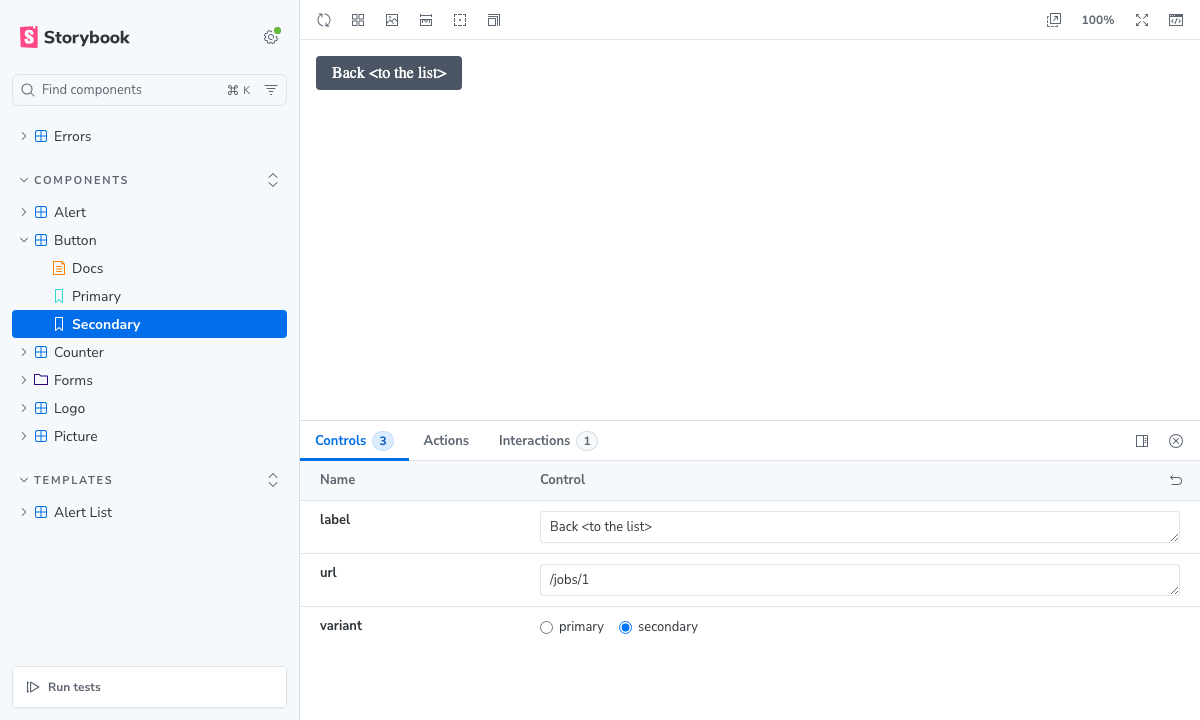
Only the name of an Element (under the allowed directories) and the args are sent: templates and code are never received from the client, since PHP templates cannot be sandboxed. Stories that combine several Elements use templates on the server, selected by name (see Story templates).
In storybook dev, the Vite dev server of Storybook proxies /_storybook/render to the application, which runs in debug mode. To publish Storybook, the stories are pre-rendered into a static build, which does not need the application (see Publishing a Static Storybook).
Requirements
- PHP 8.0+ and pieceofcake2/cakephp 2.12+
- Node.js 20.19+, Storybook 10 and Vite 5 to 8
- To publish a static Storybook:
playwright-coreand Chrome or Chromium (see Publishing a Static Storybook)
Installation
Install the plugin as a dev dependency with Composer:
bashcomposer require --dev pieceofcake2/storybookThe plugin has the
cakephp-plugintype, so it is installed into your plugins directory bycomposer/installers(setinstaller-pathsin your application'scomposer.json):Layout installer-pathsPath of the plugin Modern ( config/,src/,templates/,plugins/)"plugins/{$name}/": ["type:cakephp-plugin"]plugins/Storybook/Legacy ( app/Config/,app/Plugin/)"app/Plugin/{$name}/": ["type:cakephp-plugin"]app/Plugin/Storybook/Do not install it as a regular dependency: production is deployed with
composer install --no-dev, so that the plugin is not installed there. A published Storybook is pre-rendered where the dev dependencies are installed (e.g. in CI), so the environment where it is deployed does not need the plugin (see Publishing a Static Storybook).Load the plugin with its routes in
config/bootstrap.php(legacy layout:app/Config/bootstrap.php), only when it is installed:phptry { CakePlugin::load('Storybook', ['routes' => true]); } catch (MissingPluginException) { // Not installed (composer install --no-dev) }With
CakePlugin::loadAll(), pass the option for the plugin:CakePlugin::loadAll(['Storybook' => ['routes' => true]]);.loadAll()loads only the plugins found in the plugins directories, so it does not fail when the plugin is not installed. It reads the list of plugins from the_cake_core_cache when it exists: clear the cache when you deploy (as after any change of the plugins).Loading the plugin with
'routes' => trueconnects the render route (/_storybook/render/:story), in debug mode only (Configure::read('debug')>= 1). Withdebug0, the route is not connected, and the controller also returns 404 (in case debug mode is turned off after the routes are loaded).Your
config/routes.phpmust callCakePlugin::routes()(as the default one does).Install Storybook and the framework with npm. The framework is not published to npm: install it from the plugin directory with a
file:dependency (adjust the path to where Composer installed the plugin):bashnpm install --save-dev storybook@^10 vite @storybook/addon-docs \ @pieceofcake2/storybook@file:plugins/Storybook/storybookjson{ "devDependencies": { "@pieceofcake2/storybook": "file:plugins/Storybook/storybook", "@storybook/addon-docs": "^10.6.2", "storybook": "^10.6.2", "vite": "^8.3.4" } }The built files of the framework are included in the package, so no build step is needed. Run
npm installagain after updating the plugin with Composer.If your npm configuration sets
ignore-scripts=true, Storybook works without the install scripts.npm cialso works where the plugin is not installed (e.g. in the build of production): npm links thefile:dependency, and the link is only used by Storybook.
Configuration
CakePHP
All settings are written in config/bootstrap.php (before loading the plugin), under the Storybook key:
Configure::write('Storybook', [
    // Element directories that stories can render (Elements/components/ by default)
    'elements' => ['components'],
    // Directory of the story templates under the view path (templates/Stories/), or false
    'templates' => 'Stories',
    // View settings. By default, those of AppController ($viewClass, $helpers, $ext, $theme)
    'viewClass' => null,
    'helpers' => null,
    'ext' => null,
    'theme' => null,
    // Whether PHP warnings and notices (e.g. an undefined variable) make the rendering fail
    'errorsAsExceptions' => true,
]);The controller extends Controller, not AppController: the components of your application (Security, Session, Auth, ...) and the callbacks of AppController (e.g. beforeFilter()) are not used for the render requests, so they are not subject to the CSRF and form tampering checks of the Security component, and do not start a session. Only the view settings of AppController are read (without instantiating it), so that Elements are rendered by the same View class (e.g. AppView) with the same helpers and h() as in the application. Set Storybook.helpers if a helper needs something that only exists in a normal request.
Storybook
.storybook/main.ts:
import type { StorybookConfig } from '@pieceofcake2/storybook';

const config: StorybookConfig = {
    stories: ['../stories/**/*.stories.ts'],
    addons: ['@storybook/addon-docs'],
    framework: {
        name: '@pieceofcake2/storybook',
        options: {
            // URL of the CakePHP application, to which storybook dev proxies the render requests
            server: 'http://localhost:8765',
            // Other paths to proxy to the application (images, built assets, ...)
            proxyPaths: ['/img', '/build'],
            // Reload the stories when the templates change
            watchPaths: ['templates'],
        },
    },
};

export default config;| Option | Description |
|---|---|
server | URL of the CakePHP application. storybook dev proxies /_storybook/render and proxyPaths to it, with the X-Storybook-Proxy: true header. Not used by storybook build. |
proxyPaths | Other paths (a string or an array) to proxy to the application, e.g. the images and the files referred to by the HTML of the Elements. |
watchPaths | Files or directories (relative to the project) whose changes reload the stories in storybook dev. |
excludeVitePlugins | Names of the Vite plugins of your Vite config to remove in Storybook (default: ['hot-file']). See The Vite Config of the Application. |
builder | Options of @storybook/builder-vite, e.g. viteConfigPath. |
.storybook/preview.ts loads the CSS and the JavaScript of the application, by importing the entry of your assets. Vite processes it with your Vite config (Sass, aliases, ...), with HMR in storybook dev:
import type { Preview } from '@pieceofcake2/storybook';

import '../assets/app.ts';

const preview: Preview = {
    tags: ['autodocs'],
};

export default preview;After each render, the scripts in the HTML of the story are run and DOMContentLoaded is dispatched again, so the scripts of the application that initialize the page on DOMContentLoaded also run for each story. Scripts that run once when they are imported only run for the first story: run them on DOMContentLoaded instead.
To add tags to the <head> of the preview (e.g. web fonts), use .storybook/preview-head.html.
If the application is not at the root of its origin (e.g. App.base is /app), set the URL of the render endpoint in .storybook/preview.ts:
const preview: Preview = {
    parameters: {
        cakephp: { renderUrl: '/app/_storybook/render' },
    },
};Writing Stories
Stories are written in CSF (e.g. stories/components/page_header.stories.ts). Set component to the name of the Element (under templates/Elements/, without the extension); the args are the variables of the Element:
import type { Meta, StoryObj } from '@pieceofcake2/storybook';

const meta = {
    title: 'Components/Page Header',
    component: 'components/page_header',
    args: {
        theme: 'career',
        title: 'Career',
        crumbs: [['Jobs', '/career/jobs'], ['Front Office']],
        heading: 'Front Office',
    },
    argTypes: {
        theme: { control: 'select', options: ['fresh', 'career', 'rjet', 'finance', 'parttime', 'contact'] },
    },
} satisfies Meta;

export default meta;

type Story = StoryObj<typeof meta>;

export const Default: Story = {};

export const WithoutCrumbs: Story = {
    args: { crumbs: [] },
};StoryObj<typeof meta> types the args of the stories with those of the meta (other args, e.g. those of argTypes, are also allowed, since the variables of an Element are not typed). StoryObj<{ label: string }> types them with an args type instead.
Names of Elements and templates match [a-z0-9_/-]+ (lowercase, no ..), and Elements must be under one of the allowed directories (components/ by default). Args are sent as JSON: strings, numbers, booleans, null, arrays and objects (as PHP arrays). Dates are sent as ISO 8601 strings.
element('components/button') is the same as the string 'components/button'.
Story templates
To show several Elements together (e.g. a list of cards, or an Element inside a layout), write a template on the server under templates/Stories/ and select it with template():
<?php
// templates/Stories/job_list.php
/**
 * @var AppView $this
 * @var array $jobs
 */
?>
<div class="l-container">
<?php foreach ($jobs as $job) { ?>
    <?= $this->element('components/job_card', ['job' => $job]) ?>
<?php } ?>
</div>import { template, type Meta } from '@pieceofcake2/storybook';
export default {
title: 'Pages/Job List',
component: template('job_list'),
args: { jobs: [{ id: 1, title: 'Front Office' }] },
} satisfies Meta;The args are set as the view variables of the template, which is rendered without a layout. The templates directory is set by Storybook.templates.
Render functions
A story can return the Element (or the template) and the args from render:
export const Large: Story = {
    render: (args) => ({ element: 'components/button', args: { ...args, large: true } }),
};Actions
Function args (e.g. fn() or the action argTypes) are not sent to the server. They are bound to the events of the elements whose data-storybook-callbacks attribute contains the name of the arg: with data-storybook-callbacks="increment", the increment event of the element calls the increment arg.
<button type="button" data-storybook-callbacks="increment">+1</button>import { fn } from 'storybook/test';
export default {
component: 'components/counter',
args: { increment: fn() },
};To log DOM events without changing the Element, use the withActions decorator of Storybook with the actions.handles parameter:
import { withActions } from 'storybook/actions/decorator';

export default {
    component: 'components/button',
    parameters: { actions: { handles: ['click a'] } },
    decorators: [withActions],
};Docs
With @storybook/addon-docs, "Show code" shows the PHP code that renders the story, e.g. <?= $this->element('components/button', ['label' => 'Apply', ...]) ?>. In a pre-rendered (static) Storybook, it shows the pre-rendered HTML instead (see Controls in a static Storybook).
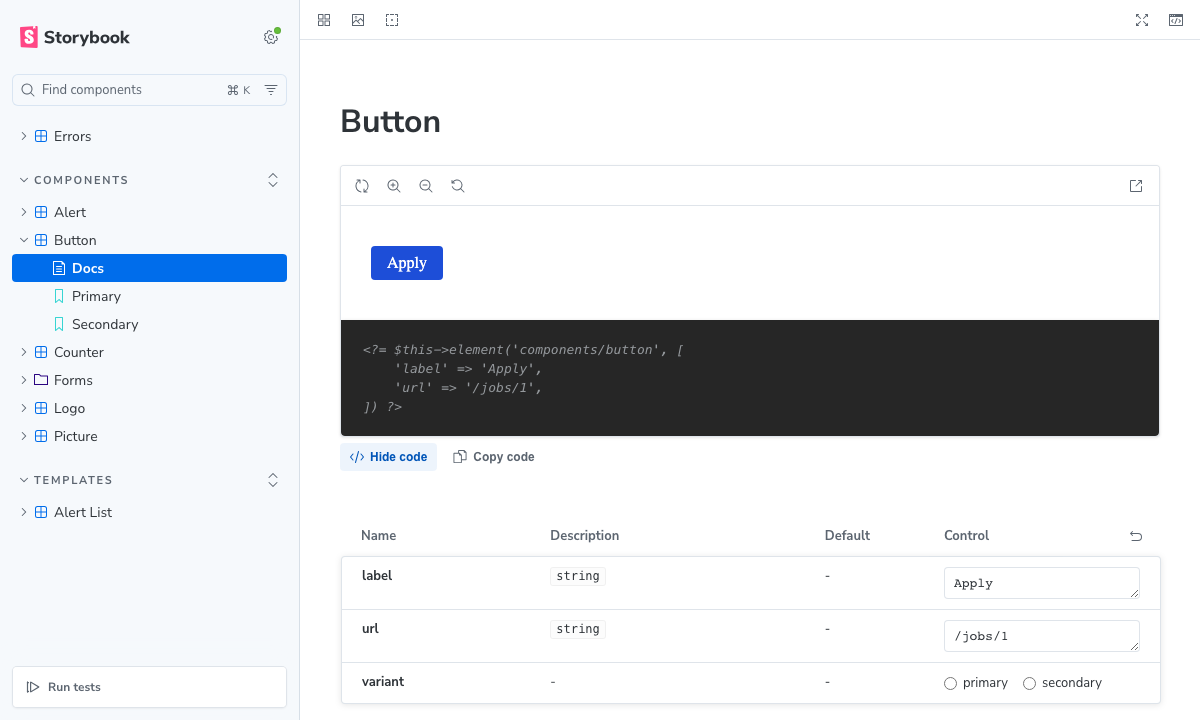
Errors
When the application returns an error, the story is marked as failed and the error page is shown in the canvas. The error page is HTML whose first line is a comment with the message (<!-- Element "components/missing" was not found. -->), with the status:
| Status | Cause |
|---|---|
| 400 | Invalid JSON, invalid name of an Element or a template, args that are not an object |
| 404 | Element outside the allowed directories, missing Element or template |
| 405 | Not a POST request |
| 500 | Error while rendering, including PHP warnings when errorsAsExceptions is true, with the message and the trace |
Running Storybook Locally
Run the application in debug mode (with the dev dependencies installed), and storybook dev:
# Terminal 1: the CakePHP application
php -d opcache.revalidate_freq=0 -S localhost:8765 -t webroot webroot/index.php

# Terminal 2: Storybook
npx storybook dev -p 6006Open http://localhost:6006. With opcache.revalidate_freq=0, the changes of the templates are rendered at once (with the default of 2 seconds, a reload by watchPaths can render the previous version). Any server can be used instead of php -S (Docker, symfony CLI, ...): set its URL in server.
You can add scripts to your package.json:
{
    "scripts": {
        "storybook": "storybook dev -p 6006",
        "build-storybook": "storybook build",
        "prerender-storybook": "storybook-cakephp prerender --server http://127.0.0.1:8765"
    }
}The Vite Config of the Application
@storybook/builder-vite loads the Vite config of your project (vite.config.ts), so that the assets are processed in the same way in Storybook. Some settings of the config of a CakePHP application do not apply to Storybook:
base,build(e.g.build.rollupOptions.input,build.outDir,build.manifest) and, instorybook dev,server(origin,port,https, ...) are replaced by the builder.- The
hot-fileplugin of the pieceofcake2/vite documentation writeswebroot/hotand removes it when the process exits: in Storybook, it would remove the hot file of a running Vite dev server, so the application would stop loading its assets from it. The framework removes the plugins named inexcludeVitePlugins(['hot-file']by default).
If your config has other plugins that must not run in Storybook, add their names to excludeVitePlugins, or check process.env.STORYBOOK, which Storybook sets to 'true':
// vite.config.ts
export default defineConfig({
    plugins: process.env.STORYBOOK === 'true' ? [] : [hotFile('webroot/hot', devServerUrl)],
});To use a different config file for Storybook, set builder.viteConfigPath in the framework options.
Publishing a Static Storybook
Stories are developed with storybook dev and the application running in debug mode (see Running Storybook Locally). To publish Storybook, e.g. on a development or staging server that runs with debug 0 and without this plugin, pre-render the stories into a static build: the published Storybook loads the HTML of the stories from its own files, and never requests the application.
Build Storybook, and pre-render it with the application running in debug mode (e.g. in CI, where the dev dependencies are installed):
# The CakePHP application in debug mode, with the dev dependencies
php -S 127.0.0.1:8765 -t webroot webroot/index.php &

npx storybook build -o storybook-static
npx storybook-cakephp prerender --server http://127.0.0.1:8765 --dir storybook-staticstorybook-cakephp prerender (a command of the framework) serves the build on a local port, and opens every story of its index.json in a headless Chrome. It forwards the render requests of the preview to the application (with the X-Storybook-Proxy: true header, as storybook dev does), and writes the responses into <dir>/cakephp-prerendered/<story id>.json. Finally, it adds <meta name="storybook-cakephp-prerendered"> to <dir>/iframe.html: with it, the preview loads the stories from cakephp-prerendered/ relative to iframe.html, so the build works under any path (e.g. https://dev.example.com/storybook/).
Since the stories are rendered by the built preview, the pre-rendered HTML is made from the args exactly as the build computes them: the args of the meta and of the story, the render functions, the args set by play functions, and the URLs of the assets imported by the stories (import photo from './photo.jpg'), which point into the build. The URL where the build is served is stored as a placeholder, and replaced with the URL of the deployed Storybook.
Requirements
playwright-core, an optional peer dependency of the framework, which downloads no browser:npm install --save-dev playwright-coreChrome or Chromium, set by
--browser:--browserBrowser chrome(default)The installed Google Chrome (GitHub-hosted runners have it) msedge,chrome-beta, ...Other installed browsers (channels of Playwright) chromiumThe Chromium of Playwright ( npx playwright install chromium)A path (e.g. /usr/bin/chromium)A Chrome or Chromium executable The
STORYBOOK_CAKEPHP_BROWSERenvironment variable sets the default.
Options
| Option | Description |
|---|---|
--server <url> | URL of the CakePHP application, running in debug mode (required) |
--dir <dir> | Directory of the Storybook build (default: storybook-static) |
--browser <browser> | Browser (default: chrome, see above) |
--concurrency <n> | Number of stories rendered at the same time (default: 4) |
--timeout <ms> | Timeout of a story (default: 30000) |
The command fails (exit status 1) when a story cannot be pre-rendered (e.g. it times out, it throws an exception, or the render endpoint is not available because the application is not in debug mode). Stories for which the application returns an error are pre-rendered with the error page, as storybook dev shows them, and listed as warnings.
Run storybook-cakephp prerender after each storybook build, which replaces the directory. If npx storybook-cakephp is not found after updating the plugin, run npm install again.
Controls in a static Storybook
The stories are pre-rendered with their own args, and a static Storybook cannot render other args. Its controls are read-only: the Controls panel and the table of the args in Docs show the args (their names, descriptions and types) without editors, and the value of each arg in the story in the "Default" column (unless table.defaultValue is set in its argTypes). Long arrays and objects are shown in a tooltip. The framework sets control: false for every arg when the build is pre-rendered, so storybook dev keeps the editors.
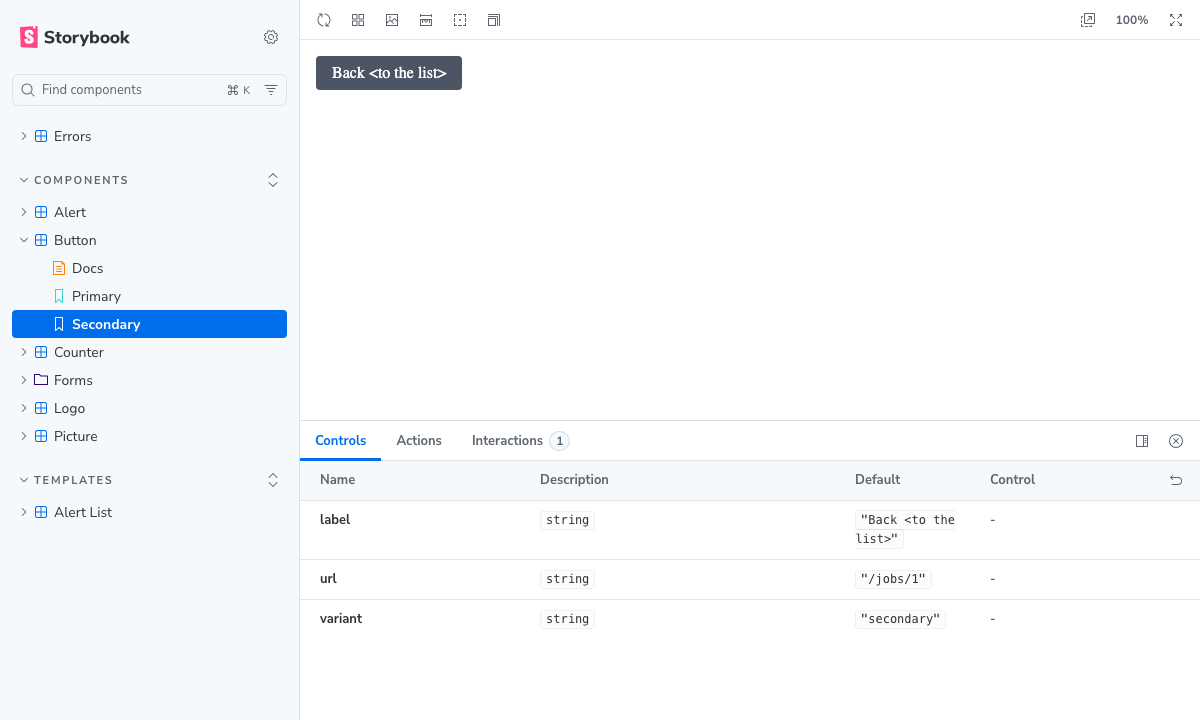
The rest works as in storybook dev: the stories and the Docs show the pre-rendered HTML, its scripts run, and play functions and actions (data-storybook-callbacks) work.
Since the args cannot be changed, "Show code" in Docs shows the pre-rendered HTML of the story (as the application rendered it, not reformatted) instead of the PHP code. For args that were not pre-rendered, it shows the PHP code.
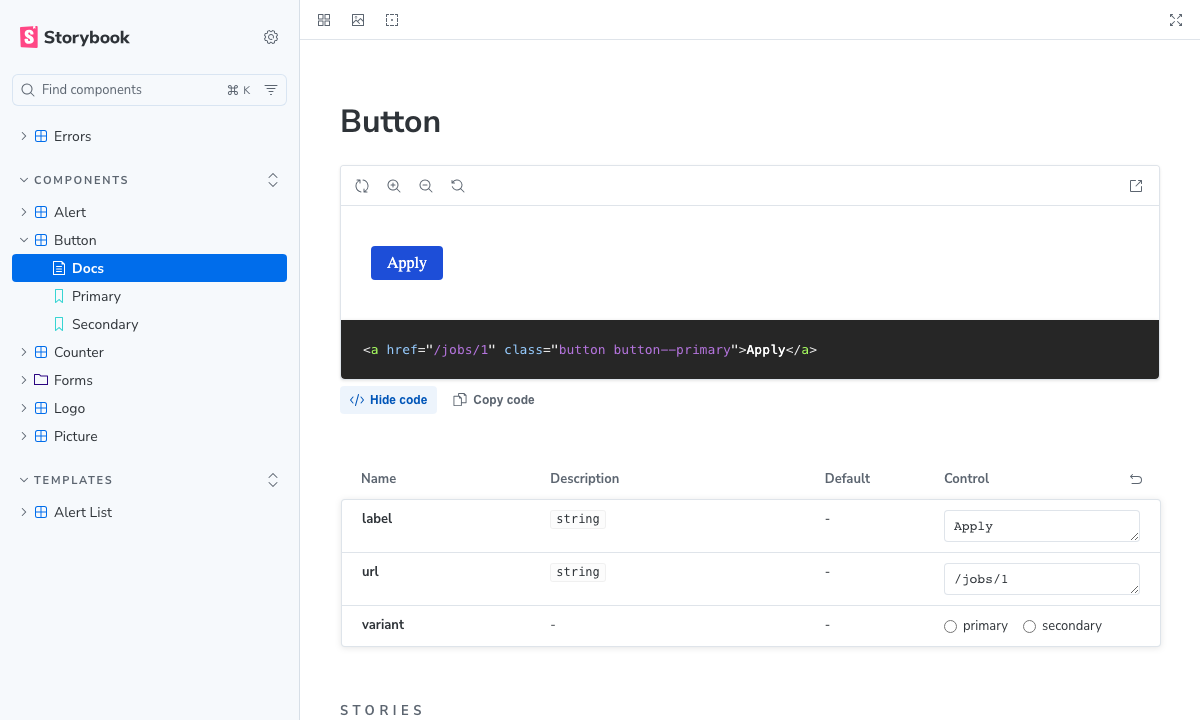
If the args are still changed (e.g. by the args parameter of the URL), the canvas shows a notice ("This story cannot be rendered with these args") instead of the story. The args must also be the same every time the stories are loaded: an arg such as new Date() differs between the pre-rendering and the published Storybook, so the story shows the notice.
Deployment
The pre-rendered build is static files: deploy it with the other static files of the environment, e.g. under /storybook/ of the development server (npx storybook build -o webroot/storybook, with webroot/storybook/ in .gitignore), or to the storage or CDN that serves the site. The plugin is not needed there, so the environment can be deployed with composer install --no-dev like production. The HTML of the Elements refers to the images and assets of the application (e.g. /img/logo.svg) by their URLs: deploy Storybook on the same host as the application, so that they are found.
For example, in GitHub Actions:
- run: composer install --no-interaction
- run: npm ci
- name: Build and pre-render Storybook
  run: |
    php -S 127.0.0.1:8765 -t webroot webroot/index.php &
    npx storybook build -o storybook-static
    npx storybook-cakephp prerender --server http://127.0.0.1:8765 --dir storybook-static
  env:
    APP_DEBUG: 1 # However your application turns on debug mode
# Then upload storybook-static/ to /storybook/ of the development environmentThe application only has to render the Elements of the stories in CI: set up what they need (e.g. a database, if the helpers or the Elements read from it).
A build that is not pre-rendered sends the render requests to /_storybook/render of its origin. It works only on the same origin as an application in debug mode with the plugin (e.g. served by the application locally).
Keeping Storybook out of Production
The render endpoint renders any Element of the allowed directories with arbitrary args, which is not meant for production. It works only in debug mode, and the plugin is a dev dependency, which is not installed in production.
- Install the plugin with
composer require --dev, and deploy production withcomposer install --no-devand debug mode off. Check thatPOST /_storybook/render/xreturns 404 there. - Publish Storybook as a pre-rendered build (see Publishing a Static Storybook). Do not deploy it to production, or exclude it from the files deployed to production (e.g.
webroot/storybook/).
Security
- Only the name of an Element or of a story template, and the args are received. Templates and code are never received from the client, since PHP templates cannot be sandboxed.
- Names must match
[a-z0-9_/-]+and cannot contain.., a leading/, a plugin prefix or an extension. Elements must be under the allowed directories (Storybook.elements), and templates under the templates directory (Storybook.templates, which can be disabled with false). - The args must be a JSON object whose keys are valid PHP variable names (not
this). - The endpoint exists only where the plugin is installed (a dev dependency, not installed in production), and only in debug mode (
debug>= 1, otherwise 404). It accepts only POST requests, and returnsCache-Control: no-storeandX-Robots-Tag: noindex. The messages and traces of server errors are shown, as in debug mode. - The endpoint does not use the Security component (CSRF) or the session, since the requests come from Storybook without a form. Do not install it where the Elements could expose data to unauthorized users: Elements are rendered with the args of the request, and with whatever the helpers and the Elements read by themselves (configuration, database, ...).
Testing Stories
Stories can be tested with @storybook/addon-vitest (play functions, interactions and accessibility), with the application running: the framework adds the same proxy to the Vite server of Vitest.
// vitest.config.ts
import { storybookTest } from '@storybook/addon-vitest/vitest-plugin';
import { playwright } from '@vitest/browser-playwright';
import { defineConfig } from 'vitest/config';

export default defineConfig({
    plugins: [storybookTest({ configDir: '.storybook' })],
    test: {
        browser: {
            enabled: true,
            headless: true,
            provider: playwright(),
            instances: [{ browser: 'chromium' }],
        },
    },
});The repository of this package runs the stories of its test application in this way. It also checks every story of the build served by the application, and of the pre-rendered build served as static files with the application stopped (tests/test_app/bin/e2e.sh).
Limitations
- Args are JSON values, so Elements that expect objects (e.g. entities or
DateTime) need a story template that builds them, or an Element that accepts arrays. - The request is a POST request to
/_storybook/render, so Elements that depend on the current request (URL, query, session, logged-in user) render with that request. - A pre-rendered Storybook shows the stories with their own args only, with read-only controls (see Controls in a static Storybook).
- Element caching (the
cacheoption ofelement()) and plugin Elements (Plugin.name) are not supported. - The framework uses the Vite builder only (no Webpack).