
Filebinder Documentation

Filebinder attaches files to the records of CakePHP 2 models. You list the file fields of a model in $bindFields, and the Filebinder.Bindable behavior saves the uploaded files.
The behavior saves the file data, such as the name, the content type and the size, in an attachment table. It saves the files themselves in a local directory, in the database, on Amazon S3, or in several of them. find() returns the file data with each record.
Two more classes help in controllers and views. The Filebinder.Ring component prepares the uploaded files for saving, and keeps them between the requests of a form with a confirmation page. The Filebinder.Label helper shows the files as images, links or URLs.
- Requirements
- Installation
- Database
- Quick Start
- Configuration: the bound fields, the behavior settings and the application settings
- Storage: local files, the database, restoring, replacing and deleting files
- Amazon S3: the S3 clients, credentials, and public and private files
- Validation: rules for the extension, the content type and the size
- Ring Component: uploads and forms with a confirmation page
- Label Helper: images, links and URLs of the files, and how the loader protects them
- Upgrading from fusic/filebinder
- Origin
Requirements
- PHP 8.1+
- pieceofcake2/cakephp 2.12+
- For the S3 storage: pieceofcake2/async-aws with async-aws/simple-s3, or pieceofcake2/aws. See Amazon S3.
Installation
Install the plugin with Composer:
composer require pieceofcake2/filebinderThe plugin has the cakephp-plugin type. composer/installers installs it into your plugins directory. Set installer-paths in the composer.json of your application:
| Layout | installer-paths |
|---|---|
Modern (config/, src/, templates/, plugins/) | "plugins/{$name}/": ["type:cakephp-plugin"] |
Legacy (app/Config/, app/Plugin/) | "app/Plugin/{$name}/": ["type:cakephp-plugin"] |
Load the plugin in config/bootstrap.php. In the legacy layout, the file is app/Config/bootstrap.php. You can skip this step if you already call CakePlugin::loadAll().
CakePlugin::load('Filebinder');Database
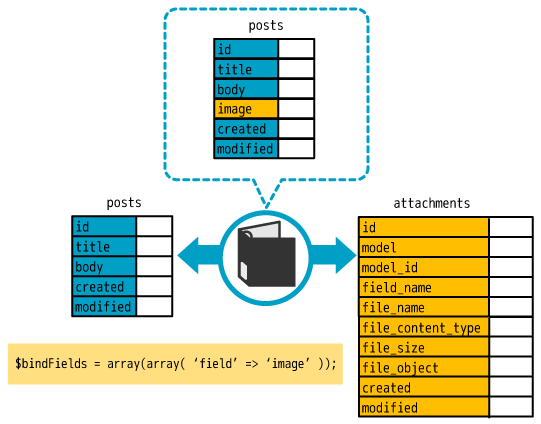
Filebinder saves the file data in an attachment table. Create it:
CREATE TABLE `attachments` (
  `id` int(11) NOT NULL AUTO_INCREMENT,
  `model` text NOT NULL,
  `model_id` int(11) NOT NULL,
  `field_name` text NOT NULL,
  `file_name` text NOT NULL,
  `file_content_type` text NOT NULL,
  `file_size` int(11) NOT NULL,
  `file_object` longtext,
  `created` datetime DEFAULT NULL,
  `modified` datetime DEFAULT NULL,
  PRIMARY KEY (`id`)
) ENGINE=InnoDB DEFAULT CHARSET=utf8;With PostgreSQL or SQLite, use the equivalent types. For example, use text for file_object.
file_object holds the contents of the files in Base64. The behavior fills it only when it uses the database storage. The database storage is the default (see Storage).
The behavior reads and writes the table through the Attachment model. You do not need to create a class for this model. The model setting of the behavior changes the model (see Configuration).
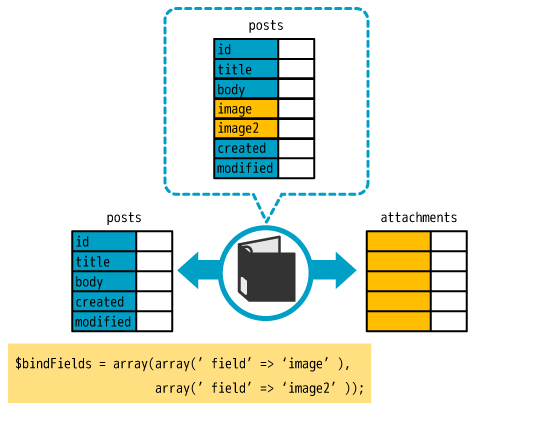
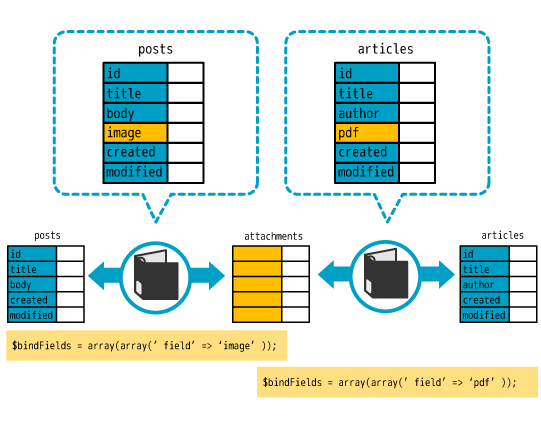
The tables of your models need no column for the file fields. Filebinder handles the file fields like a "virtual table":
Quick Start
This example adds an image field to a Post model. The form uploads a JPEG or PNG file of up to 2 MB, and the view shows it.
Model
Add the behavior to the model, and list the file field in $bindFields. The validation rules of the behavior check the file:
class Post extends AppModel
{
    public $actsAs = ['Filebinder.Bindable'];

    public $bindFields = [
        [
            'field' => 'image',
            'tmpPath' => '/var/www/html/myapp/tmp/cache/',
            'filePath' => '/var/www/html/myapp/webroot/files/',
        ],
    ];

    public $validate = [
        'title' => ['notBlank'],
        'image' => [
            'allowExtension' => [
                'rule' => ['checkExtension', ['jpg', 'jpeg', 'png']],
                'allowEmpty' => true,
            ],
            'maxFileSize' => [
                'rule' => ['checkMaxFileSize', '2MB'],
                'allowEmpty' => true,
            ],
        ],
    ];
}tmpPath is the directory for the uploaded files before they are saved. filePath is the directory of the saved files. Configuration lists all the keys of a field, and Validation lists the rules.
Controller
Add the Ring component to the controller. Call bindUp() before you save the data:
class PostsController extends AppController
{
    public $components = ['Session', 'Filebinder.Ring'];

    /**
     * Adds a post.
     *
     * @return \CakeResponse|null
     */
    public function add()
    {
        if ($this->request->is('post')) {
            $this->Ring->bindUp();
            if ($this->Post->save($this->request->data)) {
                return $this->redirect(['action' => 'index']);
            }
        }
    }
}bindUp() moves the uploaded file to the tmpPath of the field. It then replaces the upload data in the request data with the file data that the behavior saves. See Ring Component.
Form
The form must use the file type:
echo $this->Form->create('Post', ['type' => 'file']);
echo $this->Form->input('title');
echo $this->Form->input('image', ['type' => 'file']);
echo $this->Form->end(__('Submit'));Reading the File Data
find() returns the file data in the file field:
$this->set('post', $this->Post->findById(1));$post['Post']['image'] then holds this array:
[
    'id' => 10,
    'model' => 'Post',
    'model_id' => 1,
    'field_name' => 'image',
    'file_name' => 'photo.jpg',
    'file_content_type' => 'image/jpeg',
    'file_size' => 12345,
    'created' => '2026-10-22 10:00:00',
    'modified' => '2026-10-22 10:00:00',
    'file_path' => '/var/www/html/myapp/webroot/files/Post/1/image/photo.jpg',
    'bindedModel' => 'Attachment',
]When the record has no file, the field is null.
Showing the File
The Ring component adds the Label helper to the controller. Pass the file data to the helper:
echo $this->Label->image($post['Post']['image']);The helper outputs an img tag. See Label Helper for links, URLs and private files.
Origin
This package is a maintained fork of fusic/filebinder (2.0 branch, fusic/filebinder on Packagist), originally by Fusic Co., Ltd.. pieceofcake2 maintains it for CakePHP 2 on modern PHP. The commit history since the fork lists the changes from the original.