
E2E Testing
End-to-end (E2E) tests open your application in a real browser and use it the way a user does: they click links, fill in forms, press buttons and check what appears on the screen. The pieceofcake2/e2e-test package adds browser E2E tests to CakePHP 2 applications. It starts the application with PHP's built-in web server, drives headless Chrome with Symfony Panther, and runs the tests with PHPUnit 9.6. Test cases extend CakeTestCase, so $fixtures work as in your other tests.
This page explains when E2E tests are useful, how to set them up and how to write them. The package documentation is the full reference for every option and method.
When to Use E2E Tests
CakePHP applications are usually tested on several levels (see Types of Tests):
| Unit tests | Controller tests (testAction()) | Integration tests | E2E tests | |
|---|---|---|---|---|
| Runs | In the PHPUnit process | In the PHPUnit process, no HTTP | In the PHPUnit process, no HTTP | A real HTTP server and a real Chrome |
| Speed | Milliseconds | Milliseconds per request | Milliseconds per request | Seconds per test |
| JavaScript, CSS, layout | No | No | No | Yes |
| Cookies, sessions, redirects | - | Simulated | Simulated through the real dispatcher | Real |
SecurityComponent tokens | - | Usually disabled or mocked | Generated from the posted data | Real tokens from the real form |
| View variables, return values | Yes | Yes | Yes | No, only what a user sees |
| Setup | None | None | None | Chrome, chromedriver, a test database for the server |
E2E tests are the right tool for:
- a user flow across several pages, such as signing up, checking out or a multi-step form;
- anything that depends on JavaScript, the layout, responsive design or the browser;
- forms protected by
SecurityComponentand the helpers used in templates: controller tests usually bypass the token validation, and integration tests compute the tokens from the posted data instead of the real form, so mistakes in the form only show up in a browser.
Test the logic of models, components and controllers, status codes and edge cases with unit and integration tests. Keep the E2E tests few and focused on the main flows: each of them runs the whole application in a browser and takes a few seconds.
How It Works
The package is a library (namespace Pieceofcake2\E2ETest\), not a CakePHP plugin, so there is nothing to load with CakePlugin::load(). It consists of:
Server, which starts your application withphp -Sand a router script. The server gets its own temporary directory for the cache, logs and sessions.Environment, which holds the server and one headless Chrome per device (pcandmobileby default) for the whole test run.E2EExtension, a PHPUnit extension that starts the server before the first test and stops the server and the browsers after the last one.E2ETestCase, aCakeTestCasewith browser helpers and assertions such asvisit(),fillField(),pressButton()andassertSeeText().
Before each test, CakeFixtureInjector loads the $fixtures into the test database, and the application server reads the same database. The browsers stay open for the whole run, but their cookies and storage are cleared before each test.
Requirements
- PHP 8.0 or later. Composer installs Panther 2.1 on PHP 8.0 and Panther 2.4 on PHP 8.1 and later (Panther 2.2 and later need PHP 8.1).
- pieceofcake2/cakephp 2.12 or later and PHPUnit 9.6.
- Google Chrome or Chromium, and a chromedriver of the same major version.
- The
domextension.
The tests run on macOS and Linux. Windows should work but is not tested.
Installation
Install the package as a development dependency:
composer require --dev pieceofcake2/e2e-testchromedriver must match the major version of the installed Chrome. The easiest way to get it is bdi, which detects Chrome and downloads the matching driver to drivers/chromedriver, where Panther looks for it:
composer require --dev dbrekelmans/bdi
vendor/bin/bdi detect driversRun bdi again after Chrome updates itself, and add /drivers to your .gitignore. You can also point to the binaries with the PANTHER_CHROME_DRIVER_BINARY and PANTHER_CHROME_BINARY environment variables. On macOS, if the downloaded driver is blocked, run xattr -d com.apple.quarantine drivers/chromedriver. In containers that run as root, set PANTHER_NO_SANDBOX=1.
Setup
The examples use the modern layout of the pieceofcake2/app skeleton. The E2E tests get their own PHPUnit configuration and directory:
your-app/
├── phpunit.xml.dist          # unit and controller tests (unchanged)
├── phpunit.e2e.xml.dist      # E2E tests
└── tests/
    ├── bootstrap.php         # your test bootstrap (unchanged)
    └── E2E/
        ├── bootstrap.php     # loads tests/bootstrap.php and configures the server
└── ContactFormTest.phpPHPUnit configuration
Keep the E2E tests in a separate configuration file, so that vendor/bin/phpunit stays fast and does not need Chrome:
<?xml version="1.0" encoding="UTF-8"?>
<!-- phpunit.e2e.xml.dist -->
<phpunit xmlns:xsi="http://www.w3.org/2001/XMLSchema-instance"
         xsi:noNamespaceSchemaLocation="./vendor/phpunit/phpunit/phpunit.xsd"
         bootstrap="tests/E2E/bootstrap.php"
         backupGlobals="false"
         stderr="true"
         colors="true">
    <php>
        <ini name="memory_limit" value="-1"/>
        <env name="DEBUG" value="0"/>
    </php>

    <!-- Starts the application server and stops it and the browsers at the end -->
    <extensions>
        <extension class="Pieceofcake2\E2ETest\PHPUnit\E2EExtension"/>
    </extensions>

    <!-- Loads $fixtures into the test database, as in your other tests -->
    <listeners>
        <listener class="CakeFixtureInjector" file="./vendor/pieceofcake2/cakephp/src/Cake/TestSuite/Fixture/CakeFixtureInjector.php"/>
    </listeners>

    <testsuites>
        <testsuite name="E2E">
            <directory>tests/E2E/</directory>
        </testsuite>
    </testsuites>
</phpunit>backupGlobals="false" is required: the server and the browsers are kept in static properties.
The bootstrap file
tests/E2E/bootstrap.php loads your usual test bootstrap and configures the application server with Environment::configure():
<?php
// tests/E2E/bootstrap.php

use Pieceofcake2\E2ETest\Environment;

require dirname(__DIR__) . '/bootstrap.php';

// The server reads its database from DB_* (config/database.php of pieceofcake2/app).
// Point it to the test database, where CakeTestCase loads the fixtures.
$database = [];
foreach (['DATASOURCE', 'HOST', 'PORT', 'USERNAME', 'PASSWORD', 'DATABASE'] as $name) {
    $value = getenv('DB_TEST_' . $name);
    $database['DB_' . $name] = $value === false ? null : $value;
}

Environment::configure([
    'server' => [
        'env' => $database + [
            'DEBUG' => getenv('E2E_DEBUG') ?: '0',
            // Never send real mail from tests
            'EMAIL_TRANSPORT' => 'Debug',
        ],
    ],
    'browser' => [
        'lang' => 'en-US',
    ],
    'artifactsDir' => dirname(__DIR__) . DS . 'E2E' . DS . 'artifacts',
]);The server process inherits the environment of the test process and then applies server.env: null removes an inherited variable and '' sets it to an empty string. Real environment variables take precedence over config/.env in pieceofcake2/app, so this is how you give the server its own settings without touching your configuration files. Typical variables are the database of the server, DEBUG=0, fixed salts (SECURITY_SALT, SECURITY_CIPHER_SEED) so that encrypted cookies stay readable, the mail transport, and empty settings for external services.
The router script
PHP's built-in web server needs a router script that sends every request that is not a file to webroot/index.php. The package ships one and uses it by default. It serves existing files (CSS, JavaScript, images) as they are, defines TMP and LOGS so that the server writes its cache, logs and sessions to its own temporary directory, and fixes SCRIPT_NAME so that CakePHP detects the base path. Your development tmp/ and logs/ directories are not touched.
You need your own router only to do more before the application boots, such as defining other constants. Copy the example router and set the server.router option to its path.
Legacy layout
The document root is detected automatically: webroot/ in the modern layout, app/webroot/ in the legacy app/ layout. In the legacy layout, the E2E bootstrap file and tests usually live in app/Test/E2E/, the PHPUnit configuration points there, and the failure artifacts go to app/tmp/e2e-artifacts/ by default. You can also set the paths explicitly:
<?php

use Pieceofcake2\E2ETest\Environment;

Environment::configure([
    'server' => [
        'workingDir' => ROOT,
        'docroot' => ROOT . DS . 'app' . DS . 'webroot',
    ],
]);app/webroot/index.php must not define TMP or LOGS before the router does; the classic file does not.
The test database
The browser can only see data that the server can read, so the server must use the database where CakeTestCase loads the fixtures, your test datasource. The bootstrap file above does this by passing the DB_TEST_* values to the server as DB_*.
- Never point the tests to your development database.
- List every table that the visited pages use in
$fixtures. Missing tables cause errors in the server. - Create the records a test needs inside the test, with models, before opening the page, and check the result of a form in the database as well as on the page. The test process and the server share the database.
- SQLite
:memory:cannot be shared between processes. Use a database file or a database server, and do not run E2E tests in parallel against the same database.
Mail
The application server is a separate process, so mail it sends cannot be captured in the test process. Never send real mail from tests: let an environment variable select the transport, and use Debug, whose DebugTransport returns the message without sending it:
// config/email.php
class EmailConfig
{
    public $default = [
        'transport' => 'Mail',
        'from' => 'you@localhost',
        'log' => true,
    ];

    public function __construct()
    {
        if (env('EMAIL_TRANSPORT')) {
            $this->default['transport'] = env('EMAIL_TRANSPORT');
        }
    }
}With 'log' => true, CakeEmail writes every message to the server's log, which a test can read:
$log = (string)file_get_contents(Environment::server()->logsDir() . 'debug.log');
$this->assertStringContainsString('To: jane@example.com', $log);Writing Tests
A complete example
Assume a contact form at /contacts/add. The Contact model requires a name and a valid email address, and the controller redirects to /contacts/thanks after saving the message. The template uses the labels that the test looks for:
<?php
// templates/Contacts/add.ctp
?>
<h1>Contact us</h1>
<?= $this->Form->create('Contact') ?>
<?= $this->Form->input('name', ['label' => 'Your name']) ?>
<?= $this->Form->input('email', ['label' => 'Email address']) ?>
<?= $this->Form->input('topic_id', ['label' => 'Topic']) ?>
<?= $this->Form->input('message') ?>
<?= $this->Form->input('agree', ['type' => 'checkbox', 'label' => 'I agree to the terms']) ?>
<?= $this->Form->end('Send') ?>The test checks the validation errors, a successful submission on a desktop browser, and the same form on a phone:
<?php
// tests/E2E/ContactFormTest.php

use Pieceofcake2\E2ETest\TestSuite\E2ETestCase;

class ContactFormTest extends E2ETestCase
{
    /**
     * Fixtures
     *
     * @var array<string>
     */
    public $fixtures = ['app.contact', 'app.topic'];

    /**
     * Required fields are reported and what was entered is kept.
     *
     * @return void
     */
    public function testValidationErrors(): void
    {
        $this->visit('/contacts/add');
        $this->fillField('Email address', 'not an email');
        $this->pressButton('Send');

        $this->assertCurrentPath('/contacts/add');
        $this->assertSeeText('Enter your name.');
        $this->assertSeeText('Enter a valid email address.');
        $this->assertFieldValue('not an email', 'Email address');
    }

    /**
     * A valid message is saved and the thank-you page is shown.
     *
     * @return void
     */
    public function testSend(): void
    {
        $this->visit('/contacts/add');
        $this->fillField('Your name', 'Jane Doe');
        $this->fillField('Email address', 'jane@example.com');
        $this->selectOption('Topic', 'Billing');
        $this->fillField('Message', 'Please send me an invoice.');
        $this->checkLabel('I agree to the terms');
        $this->pressButton('Send');

        $this->assertCurrentPath('/contacts/thanks');
        $this->assertSeeText('Thank you for your message.');

        // The browser and the test share the test database
        $contact = ClassRegistry::init('Contact')->find('first', [
            'order' => ['Contact.id' => 'DESC'],
        ]);
        $this->assertSame('jane@example.com', $contact['Contact']['email']);
    }

    /**
     * The form fits a phone screen and can be sent from it.
     *
     * @return void
     */
    public function testMobile(): void
    {
        $mobile = $this->mobile();
        $this->visit('/contacts/add', $mobile);
        $this->assertSeeText('Contact us', $mobile);
        $this->assertNoHorizontalOverflow($mobile);

        $this->submitForm('Send', [
            'Your name' => 'Jane Doe',
            'Email address' => 'jane@example.com',
            'Topic' => 'Billing',
            'I agree to the terms' => true,
        ], $mobile);
        $this->assertCurrentPath('/contacts/thanks', $mobile);
    }
}A few principles keep E2E tests reliable:
- Find things the way a user does: by link text, button text and labels, not by CSS classes.
- Actions that load a page wait for the next page. Wait explicitly for the results of JavaScript, and never use
sleep(). - Check the outcome in the database as well as on the page.
- Test one flow per test, and create the data each test needs.
Helpers
All helpers are protected methods of E2ETestCase. Their last parameter is an optional browser (?Client $client = null); without it, they use the pc browser.
Navigation and reading the page
$this->visit('/articles?page=2');
$this->assertCurrentPath('/articles?page=2');
$this->assertPageTitle('Articles');

$this->assertSeeText('First article'); // visible text only
$this->assertNotSeeText('Draft');
$this->assertResponseContains('data-id="1"'); // the HTML (DOM after JavaScript)
$this->assertElementVisible('nav .pagination');

$this->clickLink('Next');
$this->assertSame('Articles', $this->page()->filter('h1')->text());visit() (or its alias get()) opens a path or an absolute URL, and clickLink() clicks a visible link by its text. assertSeeText() checks the visible text (innerText); prefer it to assertResponseContains(), which checks the markup. page() returns a Symfony DomCrawler of the current page, and bodyText(), pageSource(), currentPath() and currentUrl() return the text, the HTML and the location.
Forms
Fields are found by their name, id or label text:
$this->fillField('Email address', 'jane@example.com'); // label text
$this->fillField('data[User][email]', 'jane@example.com'); // name
$this->selectOption('Country', 'Japan'); // option text, or value
$this->check('Send me the newsletter');
$this->uncheck('Send me the newsletter');
$this->checkLabel('I agree to the terms'); // clicks the label like a user
$this->attachFile('Attachment', TESTS . 'Fixture' . DS . 'files' . DS . 'invoice.pdf');
$this->pressButton('Save'); // waits for the next page
$this->assertFieldValue('jane@example.com', 'Email address');submitForm() fills several fields and presses a button in one call. Text fields and selects take a string, checkboxes a boolean, radio buttons their value, multiple selects an array and file fields a path. Forms protected by SecurityComponent work without changes, because the browser posts the real tokens. If JavaScript adds or changes fields, unlock them ($this->Form->unlockField()) as you must for real users.
Waiting
clickLink(), pressButton() and submitForm() return when the next page has loaded. For everything else, wait for the result:
$this->pressButton('Load more', null, false); // a JavaScript button: no new page
$this->waitForElement('.spinner');
$this->waitForText('20 more articles');
$this->waitForElementToDisappear('.spinner');
$this->waitUntil(fn($client) => $client->executeScript('return window.appReady === true;'));The waits time out after 10 seconds (the waitTimeout option or the E2E_WAIT_TIMEOUT environment variable) and fail the test with the current path in the message. waitForNavigation() runs your own action and waits for the next page.
PC and mobile
Two devices are configured: pc (1280x1024) and mobile (390x844 with Chrome's mobile emulation and an iPhone User-Agent). Each device is a separate browser with its own cookies. Pass $this->mobile() as the last argument of the helpers to use the phone, or $this->client('tablet') for a device you added. assertNoHorizontalOverflow() fails when the page is wider than the screen. You can change the devices and add others with the devices option.
Windows and cookies
$original = $this->waitForNewWindow(fn() => $this->click('#privacy-policy-link'));
$this->assertSeeText('Privacy policy'); // in the new window
$this->closeOtherWindows(null, $original);

$this->assertCookieIsSet('CAKEPHP'); // the session cookie
$this->deleteCookie('remember_me');
$this->assertCookieNotSet('remember_me');Values written by CookieComponent are encrypted in the browser, as they are for real users.
Your own base class
Put application-specific helpers, such as logging in, into a base class for your E2E tests. Logging in through the form tests what users do and does not depend on how sessions are stored:
<?php
// tests/E2E/AppE2ETestCase.php

use Pieceofcake2\E2ETest\TestSuite\E2ETestCase;
use Symfony\Component\Panther\Client;
use Symfony\Component\Panther\DomCrawler\Crawler;

abstract class AppE2ETestCase extends E2ETestCase
{
    /**
     * Tables every page needs
     *
     * @var array<string>
     */
    public $fixtures = ['app.user'];

    /**
     * Logs in through the login form, like a user does.
     *
     * @param string $email Email address
     * @param string $password Password
     * @param \Symfony\Component\Panther\Client|null $client Browser
     * @return \Symfony\Component\Panther\DomCrawler\Crawler The page after logging in
     */
    protected function login(
        string $email = 'admin@example.com',
        string $password = 'password',
        ?Client $client = null,
    ): Crawler {
        $this->visit('/users/login', $client);

        return $this->submitForm('Log in', [
            'data[User][email]' => $email,
            'data[User][password]' => $password,
        ], $client);
    }
}PHPUnit loads only the files that end with Test.php, so require the base class in tests/E2E/bootstrap.php, or add tests/E2E/ to the autoload-dev classmap in your composer.json.
Before each test, every started browser closes extra windows and deletes its cookies, localStorage and sessionStorage, so each test starts logged out. To delete the cookies, the browser opens /favicon.ico of the application first; if your application has no favicon.ico, set the resetPath option to another static file.
Failure Screenshots and HTML
When a test fails or errors, the test case saves the following files for every started browser:
| File | Content |
|---|---|
<Class>-<test>-pc.png | Screenshot of the viewport |
<Class>-<test>-pc.html | The HTML (DOM), with the URL in the first line |
<Class>-<test>-mobile.png / .html | The same for the mobile browser, if it was started |
<Class>-<test>-logs.txt | The last lines of each server log: requests and PHP errors, error.log, debug.log |
They are saved to the artifactsDir directory: tmp/e2e-artifacts/ by default, tests/E2E/artifacts/ in the bootstrap example above, or the directory in E2E_ARTIFACTS_DIR. The original failure is always reported.
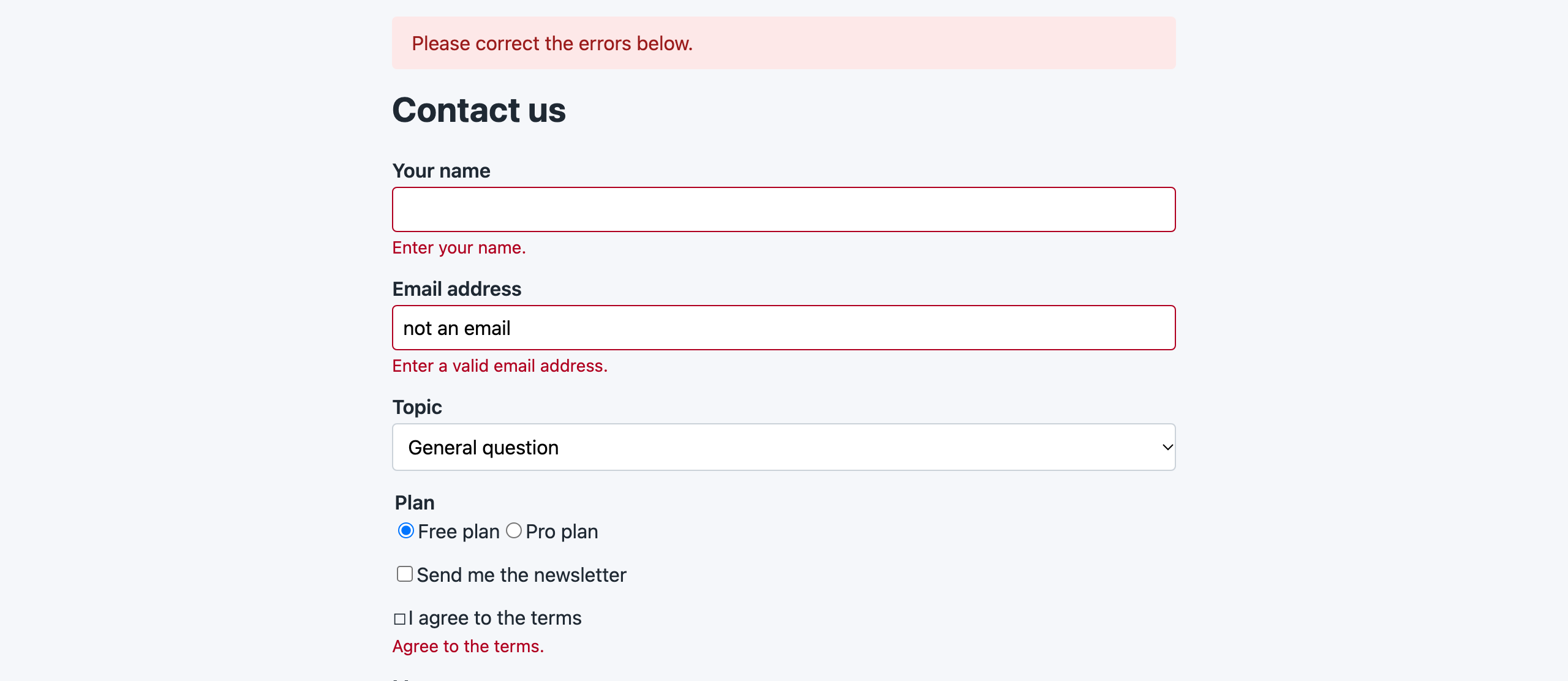
The artifacts contain the pages and logs of your test data, so keep the test data fictional. If you override onNotSuccessfulTest(), call the parent method.
Running the Tests
# All E2E tests
vendor/bin/phpunit -c phpunit.e2e.xml.dist

# One test case
vendor/bin/phpunit -c phpunit.e2e.xml.dist --filter ContactFormTest

# Watch the browser
PANTHER_NO_HEADLESS=1 vendor/bin/phpunit -c phpunit.e2e.xml.dist --filter testSendThe browsers run headless by default. PANTHER_NO_HEADLESS=1 opens visible windows, which helps when you write or debug a test. Environment variables override the configuration, so that developers and CI can change ports and binaries without editing files:
| Variable | Description |
|---|---|
E2E_PORT | Port of the application server (default: a free port) |
E2E_KEEP_TMP | 1 keeps the server's temporary directory (logs, sessions) after the run |
E2E_ARTIFACTS_DIR | Directory for failure screenshots, HTML and logs |
E2E_WAIT_TIMEOUT | Seconds the helpers wait for pages and elements (default 10) |
PANTHER_CHROME_DRIVER_BINARY, PANTHER_CHROME_BINARY | Paths to chromedriver and Chrome |
PANTHER_NO_HEADLESS | 1 opens visible browser windows |
PANTHER_NO_SANDBOX | 1 adds --no-sandbox (containers running as root) |
Continuous Integration
On GitHub Actions, run the E2E tests in their own job with a database service and a Chrome that matches its chromedriver, and upload the failure artifacts when the job fails. The main steps are:
    steps:
      # ... checkout, setup-php, composer install

      - name: Setup Chrome
        id: setup-chrome
        uses: browser-actions/setup-chrome@v2
        with:
          chrome-version: stable
          install-chromedriver: true

      - name: Run E2E tests
        env:
          PANTHER_CHROME_BINARY: ${{ steps.setup-chrome.outputs.chrome-path }}
          PANTHER_CHROME_DRIVER_BINARY: ${{ steps.setup-chrome.outputs.chromedriver-path }}
          PANTHER_NO_SANDBOX: 1
        run: vendor/bin/phpunit -c phpunit.e2e.xml.dist

      - name: Upload E2E artifacts
        if: ${{ failure() }}
        uses: actions/upload-artifact@v7
        with:
          name: e2e-artifacts
          path: tests/E2E/artifacts/
          retention-days: 7
if-no-files-found: ignoreThe complete workflow also sets up MySQL as the test database. If your build creates CSS or JavaScript files, build them before the E2E step: assertStylesheetsLoaded() fails when the stylesheets are missing.
For the other jobs of a CI workflow and a job summary with a link to the artifacts, see Continuous Integration.
Tips
- Test database. Use a separate database for the tests and pass it to the server, as in The test database.
- Mail. Use the
Debugtransport in the server and read the log, as in Mail. - Isolated tmp and logs. The server writes its cache, logs and sessions to its own temporary directory.
E2E_KEEP_TMP=1keeps it after the run, andEnvironment::server()->tmpDir()returns its path. - No sleeps. Wait for a result with
waitForText(),waitForElement()orwaitUntil(). On slow CI machines, increaseE2E_WAIT_TIMEOUTinstead of adding waits. - External hosts. Chrome resolves only the application's host, so analytics, ads, web fonts and CDNs are not loaded and cannot slow down or break the tests. Add hosts a page needs to the
browser.allowedHostsoption, or serve the files locally in tests. - Debug output. Pass a debug flag to the server (
E2E_DEBUG=1in the bootstrap example) to see CakePHP's error pages, for example whySecurityComponentblack-holed a request. - Uploads. Files uploaded through the browser are saved by the server. Point the upload location to a temporary directory in tests, or delete the files in
tearDown().
Troubleshooting
"This version of ChromeDriver only supports Chrome version N": chromedriver and Chrome differ in their major version. Run vendor/bin/bdi detect drivers again, or point PANTHER_CHROME_BINARY to a matching Chrome.
Chrome crashes at startup in Docker or CI (session not created, DevToolsActivePort file doesn't exist): set PANTHER_NO_SANDBOX=1.
Every page is an error page or "Missing database table": the server does not use the test database, or a table is missing from $fixtures. Check server.env and read <test>-logs.txt in the artifacts directory.
Logged out after every request: the server runs over plain HTTP, so the browser drops secure-only session cookies. Make the Secure flag configurable and disable it for the E2E server. A cookie domain or App.fullBaseUrl that differs from 127.0.0.1:<port> has the same effect; the server passes its URL in the E2E_BASE_URL environment variable.
Forms are black-holed: the form and the SecurityComponent token disagree, for example because JavaScript added a field that is not unlocked. Run the server with debug enabled to see the reason. Do not disable the component for E2E tests: catching these mistakes is one of the reasons to have them.
Text is not found although it is on the page: assertSeeText() sees only visible text, after CSS text-transform. Compare with the screenshot, or use assertResponseContains() for markup.
See the troubleshooting section of the package documentation for more.
API Reference
The package documentation describes every configuration option, all helpers and assertions of E2ETestCase and BrowserTestTrait, and the Environment, Server, ChromeClientFactory and E2EExtension classes. BrowserTestTrait can also be used in a plain PHPUnit TestCase for tests that need no fixtures. The browser objects are Panther clients, so everything that Panther and php-webdriver offer is available as well.