
Totp プラグインドキュメント
Totp プラグインは、CakePHP 2 アプリケーションのログインに 2 要素認証を追加します。ユーザーは ユーザー名とパスワードのあとに、認証アプリに表示される 6 桁のコードを入力します。このコードは 時間ベースのワンタイムパスワード (TOTP、RFC 6238) です。
コードはどの認証アプリでも使えます。Google Authenticator、Microsoft Authenticator、1Password、 Bitwarden、Authy、iOS と Android のパスワード管理機能などです。コードの計算には pragmarx/google2fa を使っています。
- インストール
- 設定
- データベース
- 2 ステップのログイン
- 1 ステップのログイン (TotpAuthenticate)
- 2 要素認証の有効化
- リプレイ防止
- セキュリティ
- API リファレンス
- テスト
- ceeram/google-authenticate からの移行
- 由来
インストール
動作要件: PHP 8.0 以上、pieceofcake2/cakephp 2.12 以上。
Composer でプラグインをインストールします。TotpHelper::qrCode() で QR コードを表示する場合は、bacon/bacon-qr-code も インストールします。
composer require pieceofcake2/totp
composer require bacon/bacon-qr-codeプラグインのタイプは cakephp-plugin なので、composer/installers によってプラグインディレクトリに インストールされます。アプリケーションの composer.json で installer-paths を設定してください。
| レイアウト | installer-paths |
|---|---|
モダン (config/、src/、templates/、plugins/) | "plugins/{$name}/": ["type:cakephp-plugin"] |
レガシー (app/Config/、app/Plugin/) | "app/Plugin/{$name}/": ["type:cakephp-plugin"] |
config/bootstrap.php (レガシーレイアウトでは app/Config/bootstrap.php) でプラグインを読み込みます。 すでに CakePlugin::loadAll() を使っている場合は不要です。
CakePlugin::load('Totp');設定
設定は省略できます。設定する場合は、たとえば config/bootstrap.php で Configure::write('Totp', [...]) を使います。認証オブジェクト、コンポーネント、ヘルパーの設定は、 この設定より優先されます。
Configure::write('Totp', [
    'issuer' => 'My App',
    'window' => 1,
    'secretLength' => 32,
]);| 設定 | デフォルト | 説明 |
|---|---|---|
issuer | フルベース URL のホスト名 | 認証アプリに表示されるアプリケーション名。 |
window | 1 | サーバーとスマートフォンの時計のずれを許容するため、現在の前後に受け付ける 30 秒単位の期間の数。1 では 3 つのコード、0 では現在のコードだけを受け付けます。 |
secretLength | 32 | 新しいシークレットの長さ (Base32 の文字数)。16 (80 ビット)、32 (160 ビット、RFC 4226 の推奨値)、64 のいずれか。 |
データベース
ユーザーのテーブルに、シークレットを保存するカラムを追加します。 リプレイ防止を使う場合は、最後に受け付けたコードのタイムステップを保存する カラムも追加します。
ALTER TABLE users
    ADD COLUMN secret VARCHAR(64) NULL DEFAULT NULL,
ADD COLUMN totp_time_step INT NULL DEFAULT NULL;シークレットが空 (NULL または '') のユーザーは、ユーザー名とパスワードだけでログインします。 シークレットを保存すると、そのユーザーの 2 要素認証が有効になります。
2 ステップのログイン
おすすめのログインでは、2 要素認証を有効にしていて、正しいパスワードを入力したユーザーにだけ、 2 つ目の画面でコードを入力してもらいます。
- ログイン画面でユーザー名とパスワードを入力します。
TotpComponent::login()がAuthComponentの 認証オブジェクト (たとえばForm) でこれを確認します。 - シークレットのないユーザーはそのままログインします。シークレットのあるユーザーは、ログインを セッションで保留にし (まだログインしていない状態)、コードの入力画面に移ります。
- コードの入力画面でコードを入力します。
TotpComponent::verifyLogin()がコードを確認してログインさせます。
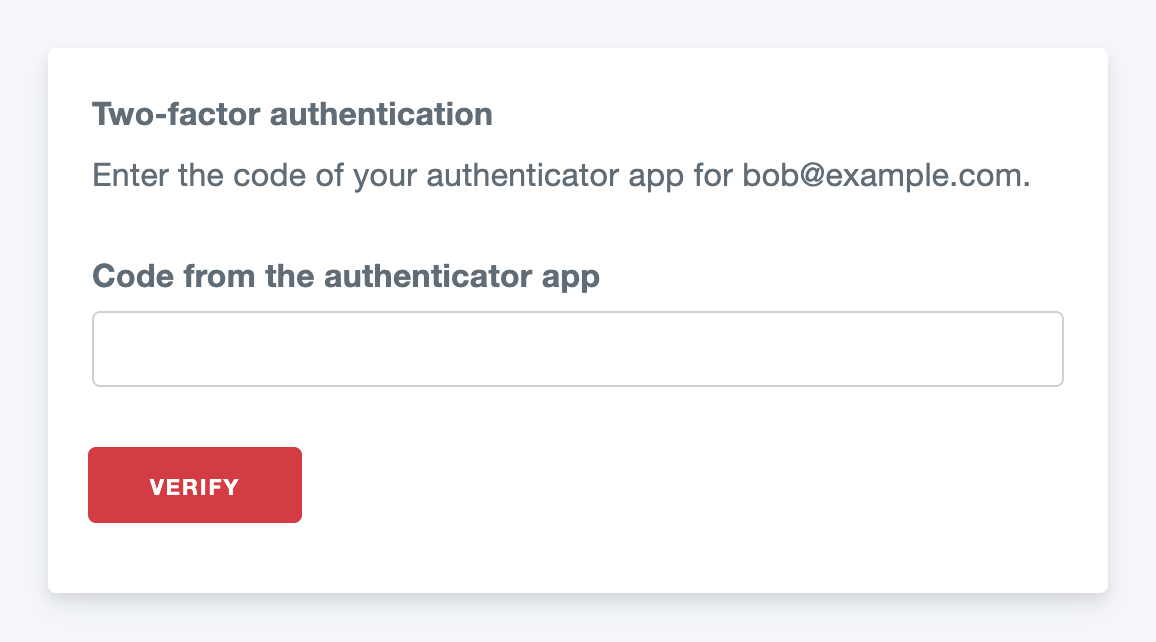
AuthComponent の認証オブジェクト (たとえば Form) はそのままにして、TotpComponent を追加します。
class AppController extends Controller
{
    public $components = [
        'Flash',
        'Auth' => [
            'authenticate' => [
                'Form' => [
                    'fields' => ['username' => 'email'],
                    'passwordHasher' => 'Blowfish',
                    'scope' => ['User.active' => 1],
                ],
            ],
        ],
        'Totp.Totp' => [
            'scope' => ['User.active' => 1],
        ],
    ];
}class UsersController extends AppController
{
/**
* Before filter.
*
* @return void
*/
public function beforeFilter()
{
parent::beforeFilter();
$this->Auth->allow('login', 'verify');
}
/**
* First step: username and password.
*
* @return CakeResponse|null
*/
public function login()
{
if ($this->request->is('post')) {
$result = $this->Totp->login();
if ($result === TotpComponent::LOGGED_IN) {
return $this->redirect($this->Auth->redirectUrl());
}
if ($result === TotpComponent::CODE_REQUIRED) {
return $this->redirect(['action' => 'verify']);
}
$this->Flash->error(__('Invalid email or password.'));
}
return null;
}
/**
* Second step: the code of the authenticator app.
*
* @return CakeResponse|null
*/
public function verify()
{
if (!$this->Totp->hasPendingLogin()) {
return $this->redirect(['action' => 'login']);
}
if ($this->request->is('post')) {
if ($this->Totp->verifyLogin($this->request->data('User.code'))) {
return $this->redirect($this->Auth->redirectUrl());
}
if (!$this->Totp->hasPendingLogin()) {
$this->Flash->error(__('Too many wrong codes. Please log in again.'));
return $this->redirect(['action' => 'login']);
}
$this->Flash->error(__('The code is not correct.'));
}
return null;
}
}<?php // templates/Users/verify.ctp (legacy layout: app/View/Users/verify.ctp) ?>
<?= $this->Form->create('User') ?>
<?= $this->Form->input('code', [
'label' => __('Code from the authenticator app'),
'autocomplete' => 'one-time-code',
'inputmode' => 'numeric',
'autofocus' => true,
]) ?>
<?= $this->Form->end(__('Verify')) ?>ログイン画面は通常どおり、ユーザー名とパスワードだけです。
| 設定 | デフォルト | 説明 |
|---|---|---|
userModel | User | ユーザーモデル。認証オブジェクトと同じモデルを指定します。 |
fields.secret | secret | ユーザーモデルのシークレットのカラム。 |
fields.timeStep | totp_time_step | リプレイ防止に使うカラム。 |
scope | [] | コードを入力した時点でもユーザーが満たしている必要がある条件。通常は認証オブジェクトの scope と同じにします。 |
replayProtection | false | 各コードを一度だけ受け付けます。 |
expires | 300 | 保留中のログインの有効期間 (秒)。 |
maxAttempts | 5 | パスワードの再入力が必要になるまでに許す、誤ったコードの回数。 |
sessionKey | Totp.pending | 保留中のログインのセッションキー。 |
issuer、window、secretLength | Totp.* | 設定を参照してください。 |
補足:
- 2 つ目のステップが必要かどうかは、認証オブジェクトのユーザーデータではなく、データベースの シークレットで判断します。そのため
userFieldsにシークレットを含める必要はありません。 ユーザーデータには主キーが含まれている必要があります。 - シークレットは、保留中のログインにもログイン後のユーザーデータにも含まれず、セッションには 保存されません。ログインするときは
AuthComponent::login()がセッション ID を新しくします。 getPendingUser()は保留中のログインのユーザーデータを返します。たとえばコードの入力画面に ユーザー名を表示するのに使えます。cancelLogin()は保留中のログインを取り消します (たとえば「戻る」リンク)。- 2 つのステップの間にユーザーのシークレットが削除された場合、パスワードは確認済みなので、
verifyLogin()はコードなしでログインさせます。
1 ステップのログイン (TotpAuthenticate)
TotpAuthenticate は、1 つのフォームでまとめて送られたユーザー名、パスワード、コードを確認します。 ceeram/google-authenticate からの移行や、2 つ目の画面を用意できない場合に使います。新しい アプリケーションには 2 ステップのログインをおすすめします。1 ステップのフォームは すべてのユーザーにコードの入力欄を表示し、パスワードを確認する前にコードを求めることになるためです。
AuthComponent の authenticate 設定で、Form の代わりに Totp.Totp を使います。 TotpAuthenticate は FormAuthenticate を継承しているので、同じ設定 (fields、userModel、 userFields、scope、recursive、contain、passwordHasher) が使えます。
class AppController extends Controller
{
    public $components = [
        'Flash',
        'Auth' => [
            'authenticate' => [
                'Totp.Totp' => [
                    'fields' => [
                        'username' => 'email',
                        'password' => 'password',
                        'code' => 'code',
                        'secret' => 'secret',
                    ],
                    'passwordHasher' => 'Blowfish',
                    'scope' => ['User.active' => 1],
                ],
            ],
        ],
    ];
}| 設定 | デフォルト | 説明 |
|---|---|---|
fields.code | code | ログインフォームのコードのフィールド。 |
fields.secret | secret | ユーザーモデルのシークレットのカラム。 |
fields.timeStep | totp_time_step | リプレイ防止に使うカラム。 |
replayProtection | false | ログインに一度使われたコードを拒否します。 |
window | Totp.window | 設定を参照してください。 |
ログインフォームにコードのフィールドを追加します。シークレットのないユーザーは空のまま送信します。
// templates/Users/login.ctp (legacy layout: app/View/Users/login.ctp)
echo $this->Form->create('User');
echo $this->Form->input('email');
echo $this->Form->input('password');
echo $this->Form->input('code', [
    'label' => __('Authentication code (if enabled)'),
    'autocomplete' => 'one-time-code',
    'inputmode' => 'numeric',
    'required' => false,
]);
echo $this->Form->end(__('Log in'));ログインのアクションは通常どおりです。
/**
 * Log in.
 *
 * @return CakeResponse|null
 */
public function login()
{
    if ($this->request->is('post')) {
        if ($this->Auth->login()) {
            return $this->redirect($this->Auth->redirectUrl());
        }
        $this->Flash->error(__('Invalid email, password or authentication code.'));
    }

    return null;
}コードを確認するのは、ユーザー名とパスワードが正しく、そのユーザーにシークレットがある場合だけです。 コードにはスペースやハイフンを含めても構いません (123 456)。シークレット (とタイムステップ) は ユーザーのデータから取り除かれるので、セッションには保存されません。
2 要素認証の有効化
アプリケーションの画面で、ユーザー自身が 2 要素認証を有効にできるようにします。この例では TotpComponent (上の AppController で読み込み済み) と TotpHelper を使い、issuer は 設定の値を使います。
- シークレットを生成し、確認が済むまでセッションに保存します。
- シークレットを QR コードと文字列で表示します。
- ユーザーが認証アプリで QR コードを読み取り、最初のコードを入力します。
- コードが正しい場合だけシークレットを保存します。入力を間違えてもログインできなくなることはありません。
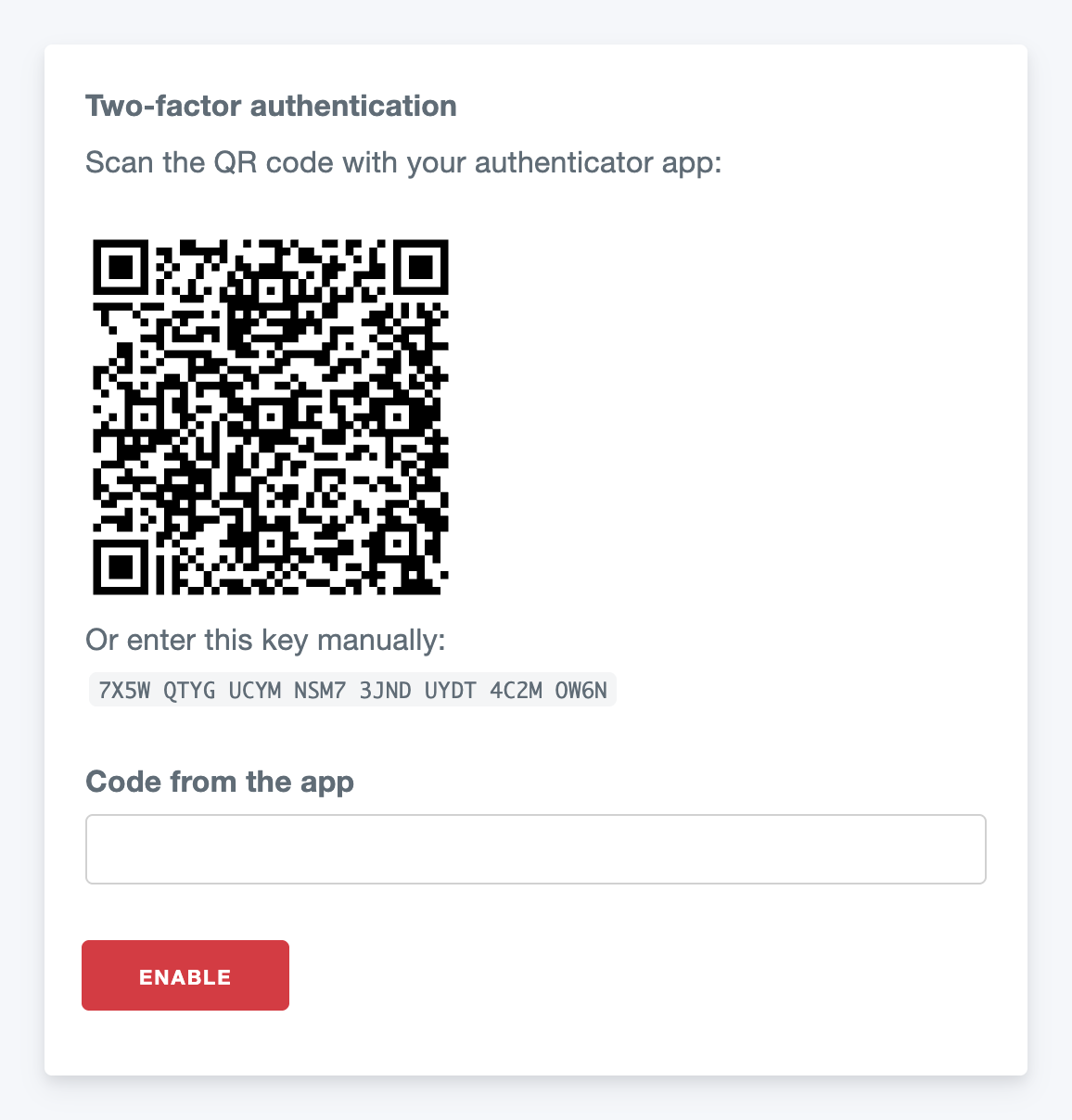
class UsersController extends AppController
{
    public $helpers = ['Totp.Totp'];

    /**
     * Enable two-factor authentication.
     *
     * @return CakeResponse|null
     */
    public function totp()
    {
        $this->User->id = $this->Auth->user('id');
        $secret = $this->Session->read('Totp.secret');
        if ($secret === null) {
            $secret = $this->Totp->generateSecret();
            $this->Session->write('Totp.secret', $secret);
        }

        if ($this->request->is('post')) {
            if ($this->Totp->verify($secret, $this->request->data('User.code'))) {
                $this->User->saveField('secret', $secret);
                $this->Session->delete('Totp.secret');
                $this->Flash->success(__('Two-factor authentication is enabled.'));

                return $this->redirect(['action' => 'view']);
            }
            $this->Flash->error(__('The code is not correct. Please try again.'));
        }

        $this->set('secret', $secret);
        $this->set('account', $this->Auth->user('email'));

        return null;
    }

    /**
     * Disable two-factor authentication.
     *
     * @return CakeResponse|null
     */
    public function disableTotp()
    {
        $this->request->allowMethod('post');
        $this->User->id = $this->Auth->user('id');
        $this->User->saveField('secret', null);
        $this->Flash->success(__('Two-factor authentication is disabled.'));

        return $this->redirect(['action' => 'view']);
    }
}<?php // templates/Users/totp.ctp (legacy layout: app/View/Users/totp.ctp) ?>
<h2><?= __('Two-factor authentication') ?></h2>
<p><?= __('Scan the QR code with your authenticator app:') ?></p>
<?= $this->Totp->qrCode($secret, $account) ?>
<p><?= __('Or enter this key manually:') ?> <code><?= $this->Totp->secret($secret) ?></code></p>
<?= $this->Form->create('User') ?>
<?= $this->Form->input('code', ['label' => __('Code from the app'), 'autocomplete' => 'one-time-code', 'inputmode' => 'numeric']) ?>
<?= $this->Form->end(__('Enable')) ?>他のセキュリティ設定と同じく、この画面を表示する前や 2 要素認証を無効にする前に、パスワード (または現在のコード) をもう一度入力してもらってください。
リプレイ防止
コードは 30 秒間有効です (window が 1 の場合は最大 90 秒)。たとえば後ろからのぞき見てコードと パスワードを知った人は、その間に同じコードでログインできてしまいます。replayProtection を有効にすると、 各コードは一度しか受け付けなくなります。設定は、コンポーネント (2 ステップのログイン) と 認証オブジェクト (1 ステップのログイン) で共通です。
'Totp.Totp' => [
    'replayProtection' => true,
    'fields' => ['timeStep' => 'totp_time_step'],
],ログインに成功すると、そのコードのタイムステップ (Unix 時刻 / 30) を totp_time_step カラム (INT NULL、データベースを参照) に保存します。以後、同じかそれより古いタイムステップの コードは拒否されます。カラムは条件付きの UPDATE で更新するので、同じコードを使った 2 つの ログインが同時に成功することはありません。userFields を設定している場合は、ユーザーのデータに 主キーが含まれている必要があります。
セキュリティ
- ログインの試行回数を制限してください。 コードは 6 桁で、同時に最大 3 つのコードが有効です。 そのため、パスワードを知っている攻撃者は、何度も試すことでコードを当てられる可能性があります。 2 ステップのログインは
maxAttempts回コードを誤ると保留中のログインを取り消しますが、パスワードは もう一度入力できます。一定回数失敗したら、アカウントをロックするかログインを遅らせてください (IP アドレスごと、アカウントごと)。 - シークレットを保護してください。 シークレットを持っていれば誰でもコードを生成できます。 ログに出力しないこと、データベースのバックアップへのアクセスを制限することに加えて、カラムの暗号化 (たとえばユーザーモデルの
beforeSave()/afterFind()でSecurity::encrypt()を使う) も検討してください。 - スマートフォンの紛失に備えてください。 このプラグインにはリカバリーコードの機能はありません。 たとえば本人確認のうえで管理者が無効にできるようにするなど、ユーザーの 2 要素認証を無効にする手段を 用意してください。
- ログインと設定の画面では HTTPS を使ってください。
- QR コード。
TotpHelper::qrCode()は QR コードをサーバーで生成するので、シークレットが他のサービスに 送られることはありません。Content Security Policy を使っている場合は、画像の data URI を許可するか (img-src 'self' data:)、qrCodeSvg()の SVG をそのまま出力してください。 - 時計。 サーバーの時計は正確でなければなりません。NTP を使ってください。
API リファレンス
TotpService
App::uses('TotpService', 'Totp.Lib'); コンポーネントとヘルパーはこのクラスを使っています。 モデルやシェルなど、それ以外の場所でも使えます。
| メソッド | 説明 |
|---|---|
__construct(array $settings = [], ?Google2FA $google2fa = null) | 設定は Configure::read('Totp') より優先されます。 |
generateSecret(?int $length = null): string | ランダムな Base32 のシークレットを新しく生成します。 |
verify(?string $secret, string|int|null $code): bool | コードを確認します。シークレットが空または不正な場合は false です。 |
verifyNewer(?string $secret, string|int|null $code, ?int $lastTimeStep): int|false | $lastTimeStep より新しいコードを確認し、そのタイムステップを返します。 |
otpauthUri(string $secret, string $account, ?string $issuer = null): string | QR コード用の otpauth://totp/... URI。 |
getCurrentCode(string $secret): string | 現在のコード (テスト用)。 |
saveTimeStep(Model $model, string|int $id, string $field, int $timeStep): bool | リプレイ防止のため、受け付けたコードのタイムステップを保存します (条件付きの UPDATE)。 |
getSetting(?string $key = null): mixed | 設定 (またはすべての設定)。 |
getGoogle2FA(): Google2FA | pragmarx/google2fa のインスタンス。それ以外の設定 (アルゴリズム、桁数) に使います。 |
TotpComponent
public $components = ['Totp.Totp' => [/* settings */]]; 設定は 2 ステップのログインを 参照してください。
| メソッド | 説明 |
|---|---|
login(): string | 1 つ目のステップ: AuthComponent::identify() でユーザー名とパスワードを確認します。TotpComponent::LOGGED_IN、CODE_REQUIRED、FAILED のいずれかを返します。 |
verifyLogin(string|int|null $code): bool | 2 つ目のステップ: コードを確認してログインさせます。 |
hasPendingLogin(): bool | コードを待っている (期限切れでない) ログインがあるかどうか。 |
getPendingUser(): ?array | 保留中のログインのユーザーデータ。 |
cancelLogin(): void | 保留中のログインを取り消します。 |
generateSecret(?int $length = null): string | TotpService を参照してください。 |
verify(?string $secret, string|int|null $code): bool | TotpService を参照してください。 |
otpauthUri(string $secret, string $account, ?string $issuer = null): string | TotpService を参照してください。 |
getService(): TotpService / setService(TotpService $service): void | サービス。 |
TotpHelper
public $helpers = ['Totp.Totp' => [/* settings */]];
| メソッド | 説明 |
|---|---|
qrCode(string $secret, string $account, array $options = []): string | QR コードを SVG の data URI にした <img> タグ。オプション: issuer、size (200)、margin (1)、alt、HTML 属性。bacon/bacon-qr-code が必要です。 |
qrCodeSvg(string $secret, string $account, array $options = []): string | QR コードの SVG ドキュメント。オプション: issuer、size、margin。 |
secret(string $secret, string $separator = ' '): string | 手入力用に 4 文字ずつ区切ったシークレット (HTML エスケープ済み)。 |
otpauthUri(string $secret, string $account, ?string $issuer = null): string | TotpService を参照してください。 |
getService(): TotpService / setService(TotpService $service): void | サービス。 |
テスト
テストでシークレットのあるユーザーの有効なコードを得るには、TotpService::getCurrentCode() を使います。 たとえば 2 ステップのログインを ControllerTestCase でテストする場合は次のようにします (2 つのリクエストの間、保留中のログインはセッションに保存されています)。
App::uses('TotpService', 'Totp.Lib');

$this->testAction('/users/login', [
    'method' => 'post',
    'data' => ['User' => ['email' => 'user@example.com', 'password' => 'secret']],
]);
$code = (new TotpService())->getCurrentCode('JBSWY3DPEHPK3PXPJBSWY3DPEHPK3PXP');
$this->testAction('/users/verify', [
    'method' => 'post',
    'data' => ['User' => ['code' => $code]],
]);ceeram/google-authenticate からの移行
このパッケージは ceeram/google-authenticate (GoogleAuthenticate プラグイン) を置き換えます。 ユーザーのシークレットはそのまま使えます。
パッケージを置き換えます。
bashcomposer remove ceeram/google-authenticate composer require pieceofcake2/totp bacon/bacon-qr-codeGoogleAuthenticateの代わりにTotpを読み込みます。phpCakePlugin::load('Totp');authenticate設定で、GoogleAuthenticate.Googleの代わりにTotp.Totpを使います。fields(username、password、code、secret)、userModel、scopeの設定は同じです。 これは 1 ステップのログインのままです。移行後に 2 ステップのログインへの 切り替えを検討してください。GoogleAuthenticatorクラスを置き換えます。以前 以後 App::uses('GoogleAuthenticator', 'GoogleAuthenticate.Lib')TotpComponent、TotpHelperまたはApp::uses('TotpService', 'Totp.Lib')$Google->generateSecret()$this->Totp->generateSecret()(16 文字ではなく 32 文字)$Google->checkCode($secret, $code)$this->Totp->verify($secret, $code)$Google->getCode($secret)$service->getCurrentCode($secret)$this->Html->image($Google->getUrl($secret, $user, $host))$this->Totp->qrCode($secret, $user)getUrl()は、すでに QR コードを生成しなくなった Google Chart API を使っており、シークレットを Google に送っていました。TotpHelper::qrCode()は QR コードをサーバーで生成します。
動作の変更点:
- シークレットはセッションのユーザーデータに含まれなくなりました (
$this->Auth->user('secret')は null)。 必要な場合はデータベースから読み込んでください。 - (スペースとハイフンを取り除いたあと) 6 桁でないコードは拒否されます。
由来
このパッケージは ceeram/GoogleAuthenticate (Packagist では ceeram/google-authenticate) のメンテナンスされたフォークで、元は M. Ypes (Ceeram) によって作られました。コードは Google に固有のものではなく標準の TOTP なので、名前を変えています。 pieceofcake2 が、モダンな PHP 上の CakePHP 2 向けにメンテナンスしています。 オリジナルからの変更点は フォーク以降のコミット履歴 にあります。