
Test Report
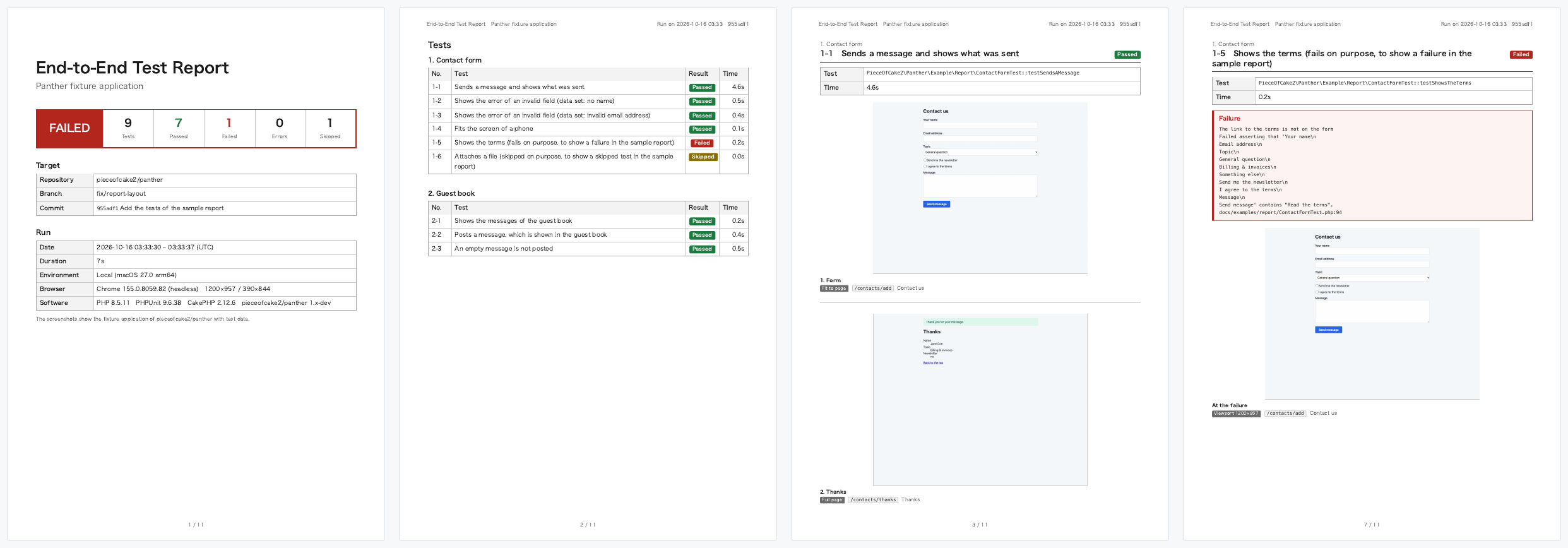
With PANTHER_REPORT_PDF, the extension writes a PDF report of the End-to-End tests after the last test: the result of every test, passed or not, with screenshots of the pages. It is a document to keep or hand over, such as the test report of a release.
PANTHER_REPORT_PDF=tmp/end-to-end-report.pdf vendor/bin/phpunit --testsuite EndToEndThe report is A4, with a header and page numbers on every page:
- Cover: the result (passed when no test failed), the numbers of tests, passed, failed, errors and skipped, the repository, branch and commit, the date, duration, environment, browser and software of the run
- Tests: the tests by class, with their results and times; each links to its page
- A page for each test: its title, result, name and time, the description of its doc comment, the message of a failure, and its screenshots
Only the tests of PantherTestCase are in the report, as PHPUnit counts them: a test that a test runs itself is not.
Sample
The report of the tests of docs/examples/report on the fixture application of this package: steps, a full page, a phone, a data provider, and a test that fails and one that is skipped on purpose.
Requirements
- The extension,
PieceOfCake2\Panther\ServerExtension(Configuration) - Chrome and its chromedriver to print the PDF, as for the tests. The report is printed by a Chrome of its own, headless, whatever the browser of the tests is
- Chrome 131+ for the header and the page numbers (CSS page margin boxes)
- Fonts of the languages of the pages and of the report: on Linux,
fonts-noto-cjkfor Japanese (CI)
Titles
The report shows the tests as PHPUnit's --testdox does, from their doc comments:
| Title | |
|---|---|
| Class | @testdox of the class, the summary of the doc comment of the class, or the class name as a sentence |
| Test | @testdox of the method, the summary of its doc comment, or the method name as a sentence |
| Description | The rest of the doc comment of the method, before the tags |
/**
 * Contact form
 */
class ContactsTest extends PantherTestCase
{
    /**
     * Shows the errors of the input, and sends the message after the correction
     *
     * The required fields are checked before the confirmation.
     */
    public function testInputErrors(): void
    {
    }

    /**
     * @dataProvider pageProvider
     * @testdox Opens $path
     */
    public function testPage(string $path): void
    {
    }
}The summary is the first paragraph of the doc comment. A test with a data provider shows the name of its data set after its title, unless its @testdox has placeholders ($path), which PHPUnit replaces with the data.
Screenshots
Every test gets a screenshot of the browser at its end, taken before tearDown():
- a failed test: the page at the failure
- a passed test: the page at its end, unless the test took screenshots of its own
A test takes the screenshots of its steps with takeReportScreenshot():
public function testApply(): void
{
    $client = static::createPantherClient();
    $client->request('GET', '/contacts/add');
    $this->takeReportScreenshot('Form');

    $client->submitForm('Confirm', $data);
    $this->takeReportScreenshot('Confirmation');

    $client->submitForm('Send');
    $this->takeReportScreenshot('Thanks', fullPage: true);
}| Call | Mode in the report | Image |
|---|---|---|
takeReportScreenshot('Name') | Viewport | What the browser shows, where it is scrolled to |
takeReportScreenshot('Name', element: '.jobs') | Element: .jobs | The viewport after the element is scrolled to the top, for a part of the page below the fold |
takeReportScreenshot('Name', fitToPage: true) | Fit to page | What fits on the page of the test under its title (190 mm) from the top of the page, or from the top of element |
takeReportScreenshot('Name', fullPage: true) | Full page | The whole page as one image. The report fills its pages with it and goes to the next page between two rows or sections of the page, wherever the page of the report ends |
element is a CSS selector, or an XPath when it starts with /, ./ or (. Without PANTHER_REPORT_PDF, takeReportScreenshot() does nothing, so the tests run as fast as before.
The screenshots are JPEG images of one pixel per CSS pixel, so that the screenshots of a phone emulated with a deviceScaleFactor of 3 are not 9 times as large; PANTHER_REPORT_JPEG_QUALITY sets their quality (default 60). Each one has its mode, the path of the page and its title. In the report, all the screenshots have the same scale, 0.1 mm per CSS pixel (0.14 mm for a viewport narrower than 768 pixels, a phone), so that a viewport of 1200 x 957 is 120 x 96 mm and two of them fit on a page. With Firefox, the screenshots are the PNG images of the viewport of WebDriver.
Failures
A failed test shows the message of PHPUnit and the line of the test where it failed:
Failed asserting that the Panther text content of "body" contains "Thank you".
tests/TestCase/EndToEnd/ContactsTest.php:42The messages of PHPUnit and Panther are in English. Give a message to the assertion to explain the failure in the words of your project; PHPUnit shows it first:
$this->assertSelectorTextContains('body', 'Thank you', 'The message was not sent');Where the tests ran
| On GitHub Actions | Elsewhere | |
|---|---|---|
| Repository | GITHUB_REPOSITORY | The origin remote of Git |
| Branch | The branch of the push, or the head branch of a pull request | The current branch |
| Commit | The pushed commit, or the head commit of a pull request (not the merge commit) | The current commit, and whether there are uncommitted changes |
| Environment | The workflow and the number of the run, with a link to it | Local and the operating system |
A value that Git cannot give is left out.
Settings
Set them like the other PANTHER_* variables, in the shell or with <server> in phpunit.xml.dist:
| Variable | Default | |
|---|---|---|
PANTHER_REPORT_PDF | Path of the PDF file. The report is written only when it is set | |
PANTHER_REPORT_LANGUAGE | en | Language of the headings and labels: en, ja, or a language of PANTHER_REPORT_LOCALE_DIR |
PANTHER_REPORT_LOCALE_DIR | Directory of <language>.json files that add languages or replace messages | |
PANTHER_REPORT_TITLE | The title of the language | Title of the report |
PANTHER_REPORT_PROJECT | The name of the Composer root package | Name of the project, under the title |
PANTHER_REPORT_NOTE | A note on the cover, e.g. that the screenshots show test data | |
PANTHER_REPORT_JPEG_QUALITY | 60 | JPEG quality of the screenshots, 1 to 100 |
<php>
    <server name="PANTHER_REPORT_LANGUAGE" value="ja"/>
    <server name="PANTHER_REPORT_NOTE" value="スクリーンショットはテスト用の架空のデータで撮影したものです。"/>
</php>Set PANTHER_REPORT_PDF in CI, or in the shell when you want a report, to keep the local runs as fast as before.
A failure to write the report is printed and does not change the result of the tests; check that the file exists in CI, e.g. with if-no-files-found: error of actions/upload-artifact (CI).
Languages
English (en) and Japanese (ja) are bundled, in resources/report/locales/. For another language, or other words, put a <language>.json file in PANTHER_REPORT_LOCALE_DIR with the messages of en.json; a message that it does not have is the English one:
{
    "title": "Rapport des tests de bout en bout",
    "verdict.passed": "RÉUSSI",
    "duration.minutes": "{minutes} min {seconds} s"
}The placeholders ({minutes}) let each language put the values in its own order. The modes of the screenshots (Viewport, Element, Full page) are not translated.